

VEX AIR Drone Competition Pick & Drop - Game Manual  | ||||||||||||||||||||||||||||||||||||||||||||||||||||||||||||||||||||||||||||||||||||||||||||||||||||||||||||||||||||||||||||||||||||||||||||||||||||||||||||||||||||||||||||||||||||||||||||||||||||||||||||||||||||||||||||||||||||||||||||||||||||||||||||||||||||||||||||||||||||||||||||||||||||||||||||||||
AIR Full Manual v1.0This page combines every section of the AIR v1.0 manual into one printable document. PrefixChangelogSection titled “Changelog”
Game Manual UpdatesSection titled “Game Manual Updates”The latest version of this manual is always at AIRmanual.vex.com. Scheduled updates add relevant Q&A answers to the rules, make rules clearer, and include any major changes. They come out when the Game Design Committee decides they are needed, on a Thursday by 5:00 PM CST (11:00 PM GMT). They are announced on the VEX Forum and through VEX Robotics social media. Small fixes for typos and grammar may be released at any time, outside this schedule. Each update takes effect seven days after it is released, so an event that starts before then uses the previous version. Urgent safety or fairness fixes may take effect right away. Older versions stay available for reference all season. Leagues use the version in effect at the start of each session. The Q&A SystemSection titled “The Q&A System”If you can’t find the answer to a rules question after reading the manual, your Team’s Adult representative can ask the Game Design Committee in the official Q&A at events.vex.com. Q&A answers are official rulings and take effect as soon as they are posted. Before posting:
Rules and Q&A answers from earlier seasons, including the 2025-26 Pick & Drop Game Manual (v0.1.1), do not apply this season. If you still need an answer, ask again in this season’s Q&A. Hierarchy of InformationSection titled “Hierarchy of Information”Official rulings come from these sources, in this order:
The Code of Conduct, the Student-Centered Policy, and the Student Eligibility Policy are the final word on their own topics. No other source is official. Rules Reference GuideSection titled “Rules Reference Guide”
Section 1 - IntroductionWhat a VEX AIR Drone Competition Looks LikeSection titled “What a VEX AIR Drone Competition Looks Like”At a VEX AIR Drone Competition event, called a Tournament, Teams of Students fly Drones to score points. An Event Partner runs the event, and a Head Referee enforces the rules. Most events follow this order:
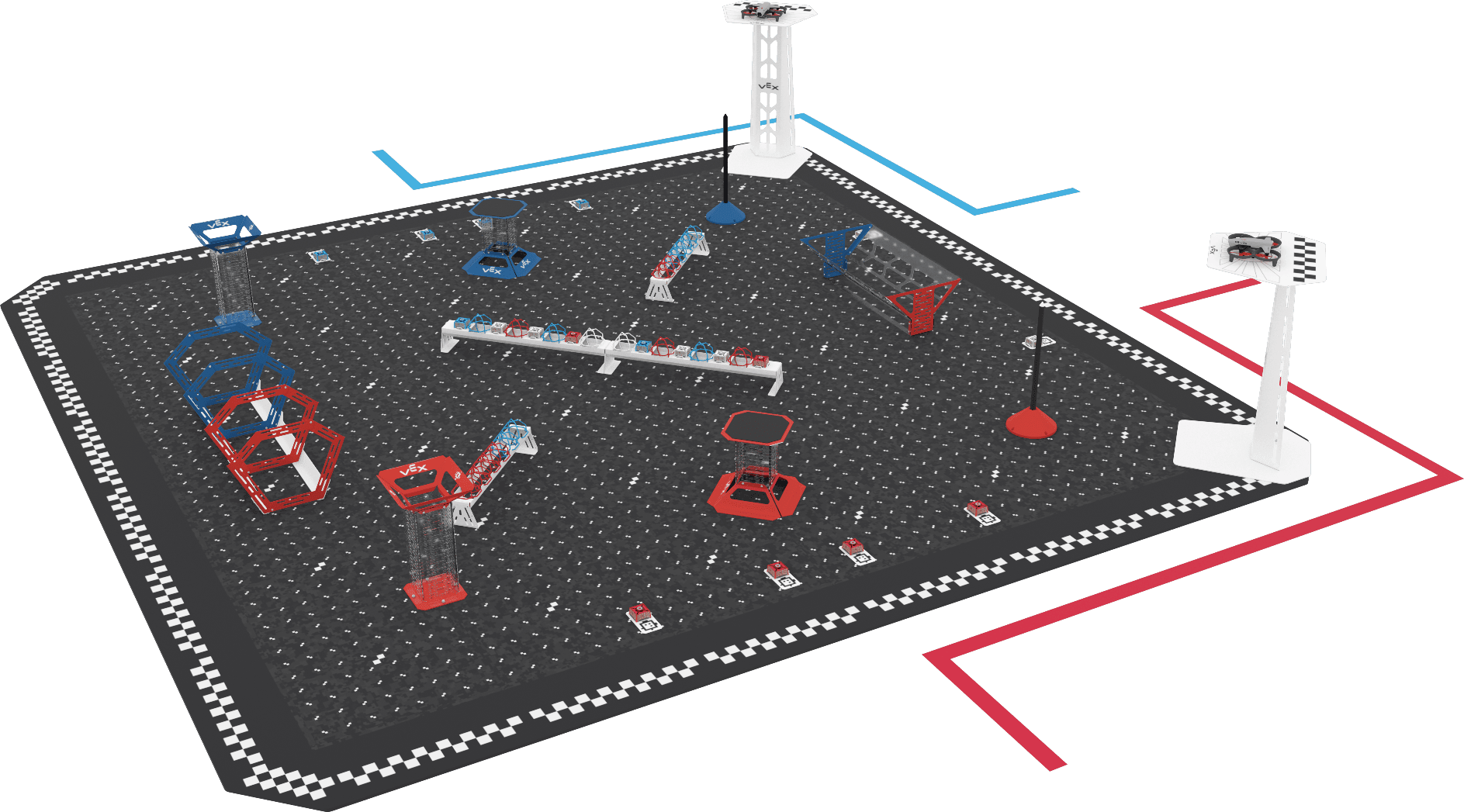
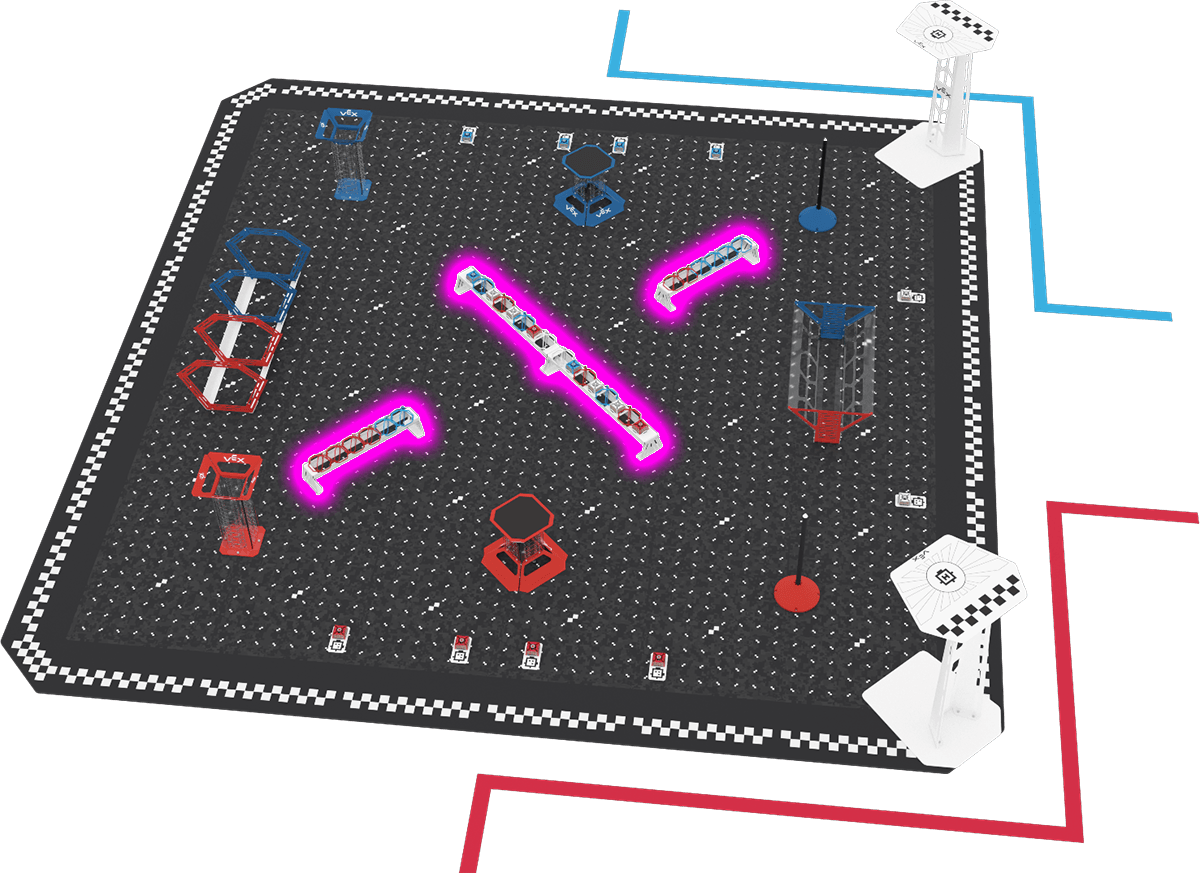
Figure I-1: An angled view of the Pick & Drop Field set up for the start of a Match. A Drone sits on each Field Platform outside the two corners on the Flight Station side, and the blue and red lines mark the Flight Stations. A Teamwork Match, start to finishSection titled “A Teamwork Match, start to finish”
About the Game ManualSection titled “About the Game Manual”This manual is the official rulebook for the VEX AIR Drone Competition and this season’s game, Pick & Drop. Everyone at an event follows it: Teams, coaches, referees, Event Partners, and volunteers. It is not a strategy guide, a flying tutorial, or a replacement for referee or Event Partner training. How to Read the Game ManualSection titled “How to Read the Game Manual”The rules work together, so read the whole manual, not just one section. Each rule has a code that tells you its group:
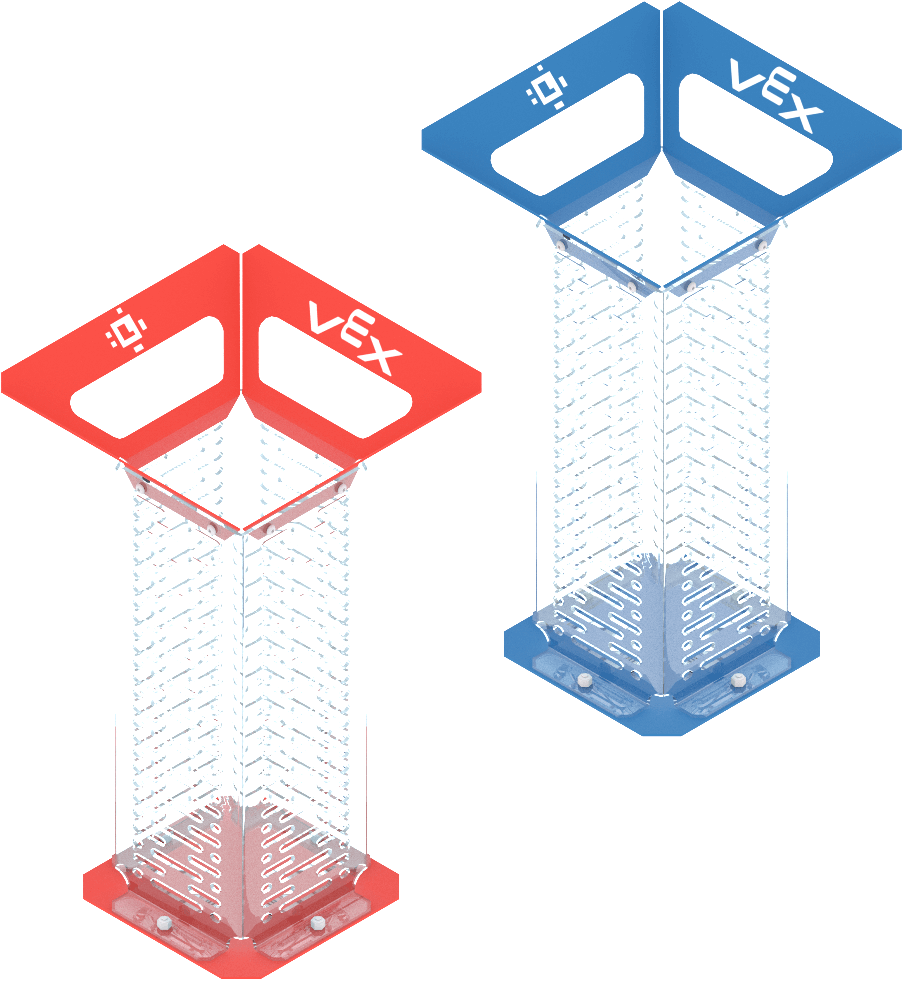
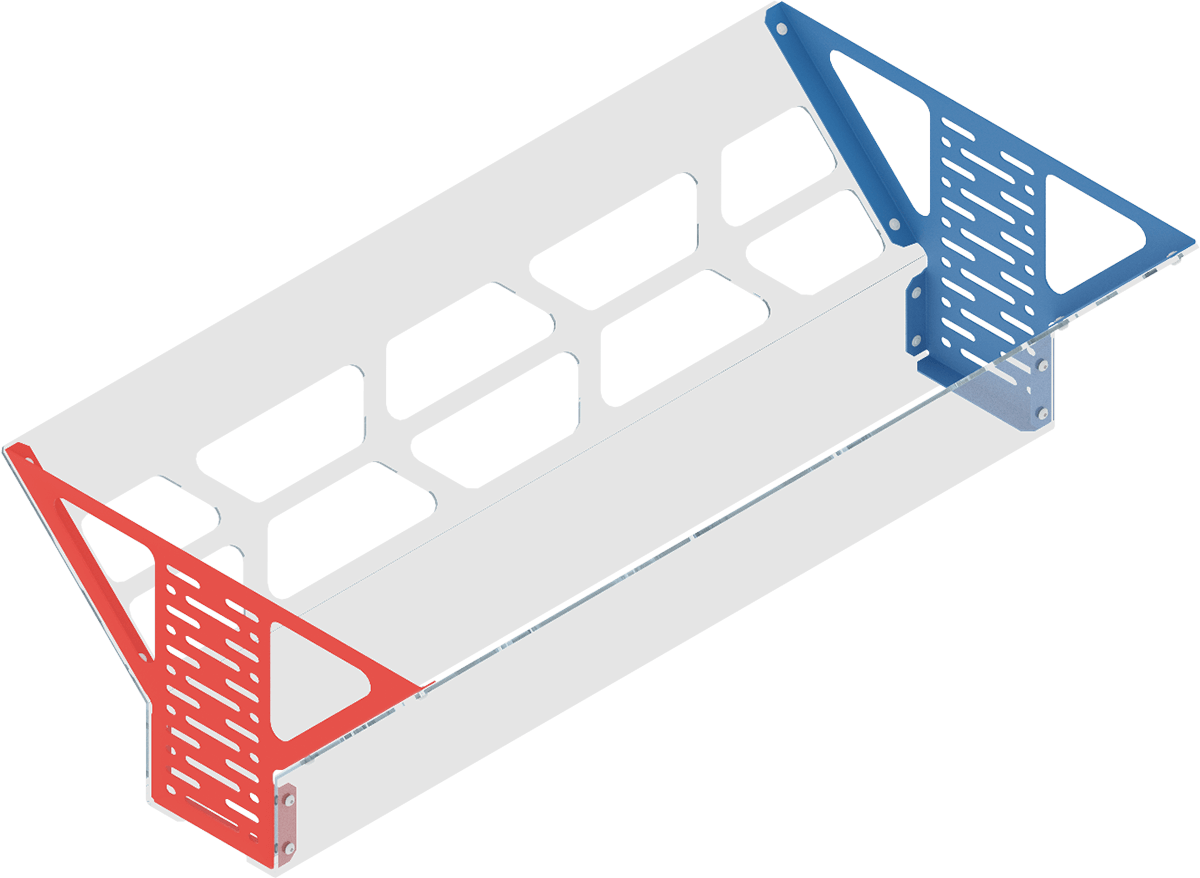
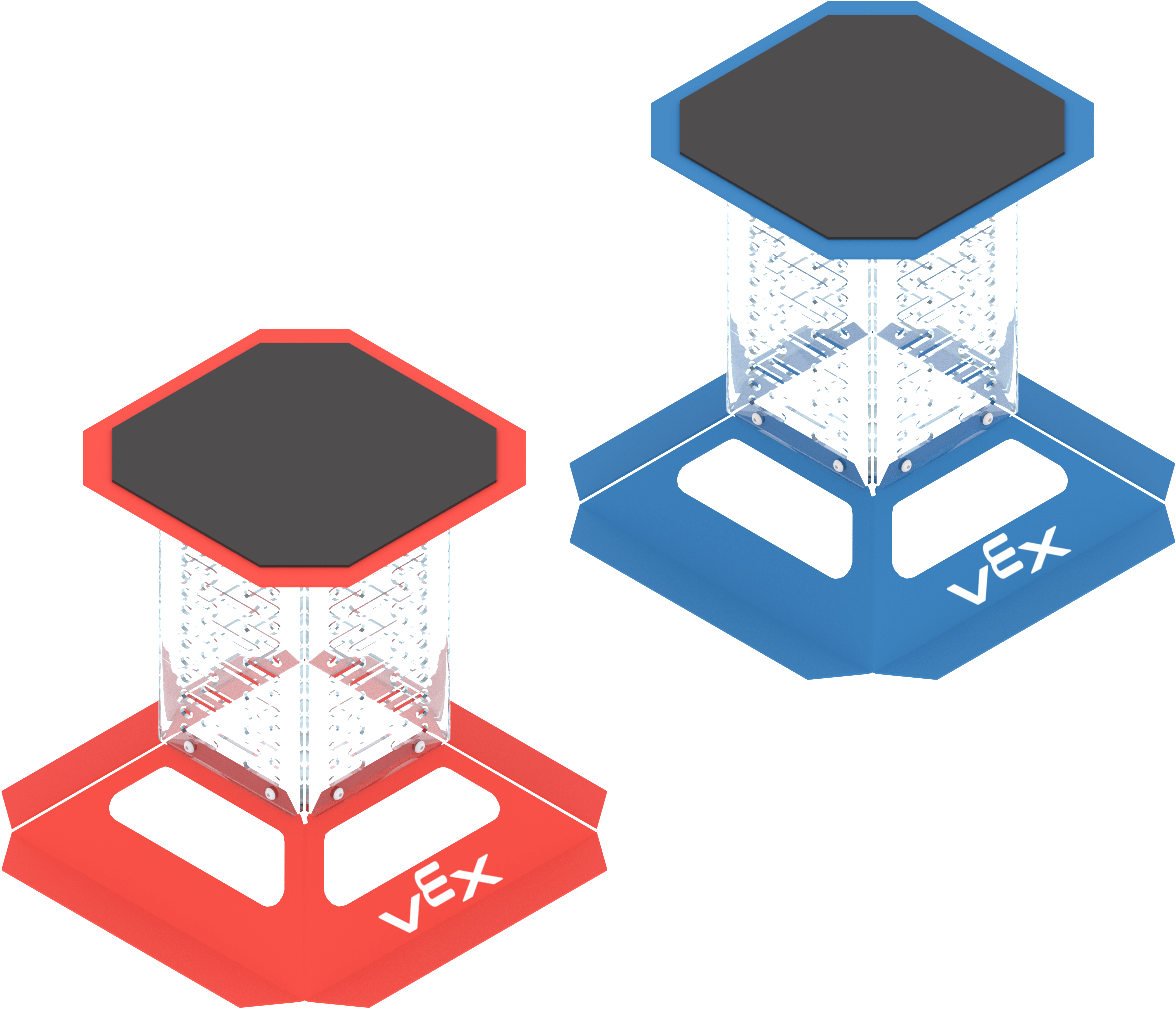
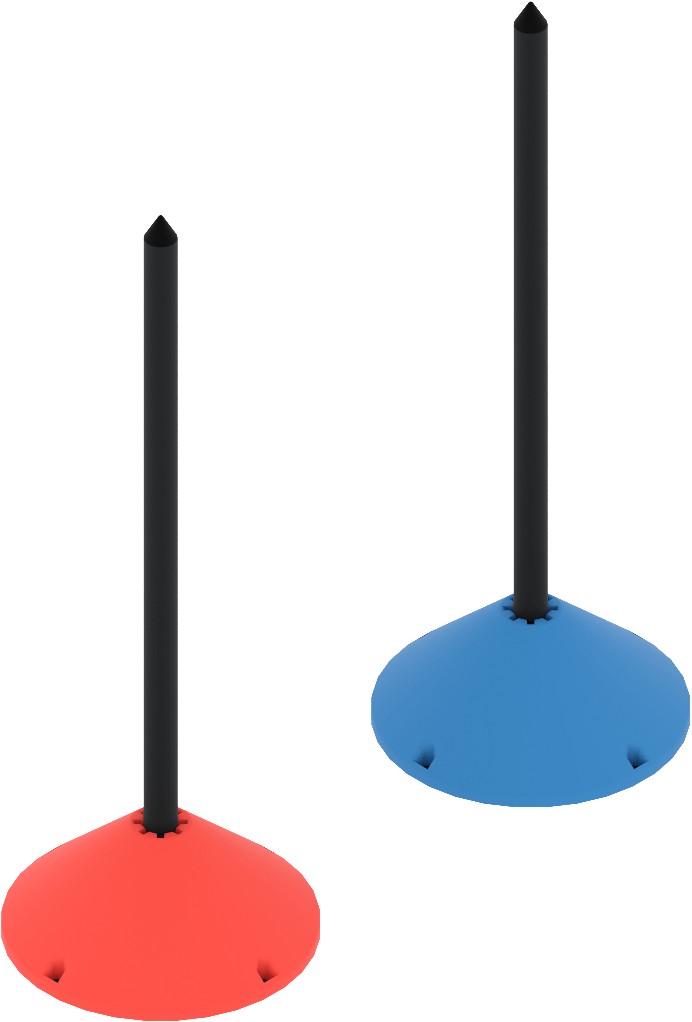
Capitalized words like Drone, Match, and Prop Lock have special meanings, listed in the Glossary (Appendix B). If a word isn’t in the Glossary, use its normal dictionary meaning. Some rules have Violation Notes that explain how the rule is enforced, such as when a Violation becomes Major. In the online manual, Violation Notes appear as a dropdown below each rule; select it to open the notes. If a rule has no Violation Notes, the standard penalties apply (see Violation, Disablement, and Disqualification in the Glossary, Appendix B). Some places in the manual also have orange-bordered boxes. They explain a rule or definition in a different way, where the Game Design Committee thought that would help. These boxes support the rules and definitions; they don’t replace them. If two sources of rules seem to disagree, see Hierarchy of Information in the Prefix at the front of this manual. Game Manual Updates and The Q&A System are there too. Game Design Philosophy - A Letter from the GDCSection titled “Game Design Philosophy - A Letter from the GDC”This is the first season of VEX AIR Drone Competition events, and we’re excited. We’ll be paying close attention all year, and what we learn from Teams, Event Partners, and referees will shape the seasons that follow. Pick & Drop was partly released last year. The early Teams told us the flying was fun, but they wanted more strategy and more variety from one Match to the next. So this season, Pick & Drop uses six Scoring Systems, with a different one for each Round. The Field, the Scoring Objects, and what counts as Scored stay the same; only the point values change. A Goal worth chasing in one Round might be worth skipping in the next. Teams that read the Scoring System and adjust will find chances that Teams flying the same plan every Match will miss. VEX AIR is also our first competition played entirely in three dimensions. We can’t wait to watch Students grow in airmanship, adaptability, spatial awareness, and the discipline to fly a plan under pressure. Good luck, and have a safe flight! The VEX AIR Drone Competition Game Design Committee Section 2 - The GamePick & Drop at a GlanceSection titled “Pick & Drop at a Glance”Pick & Drop is a cooperative Drone game played by an Alliance of two Teams on a 12’ x 12’ Field. Drones pick up Orbit Balls and Cargo and drop them into seven Goals, earning more points when a Scoring Object’s color matches its Goal. Drones also score by flying through the Ring Tunnel and by landing on a Field Platform before the three-minute Match ends. Each Round uses one of six Scoring Systems, so what each Goal is worth changes from Round to Round. Field OverviewSection titled “Field Overview”The Field includes:
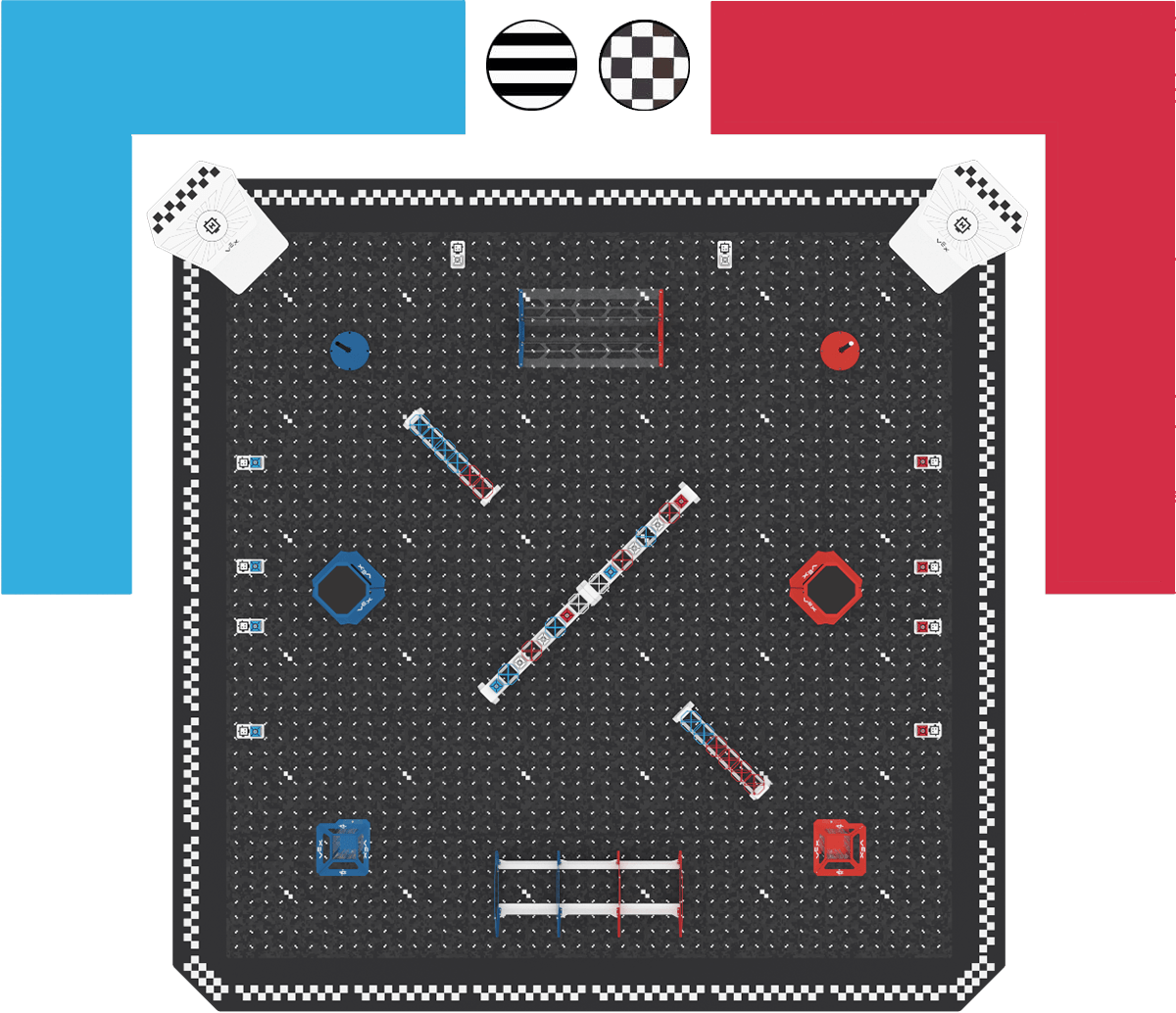
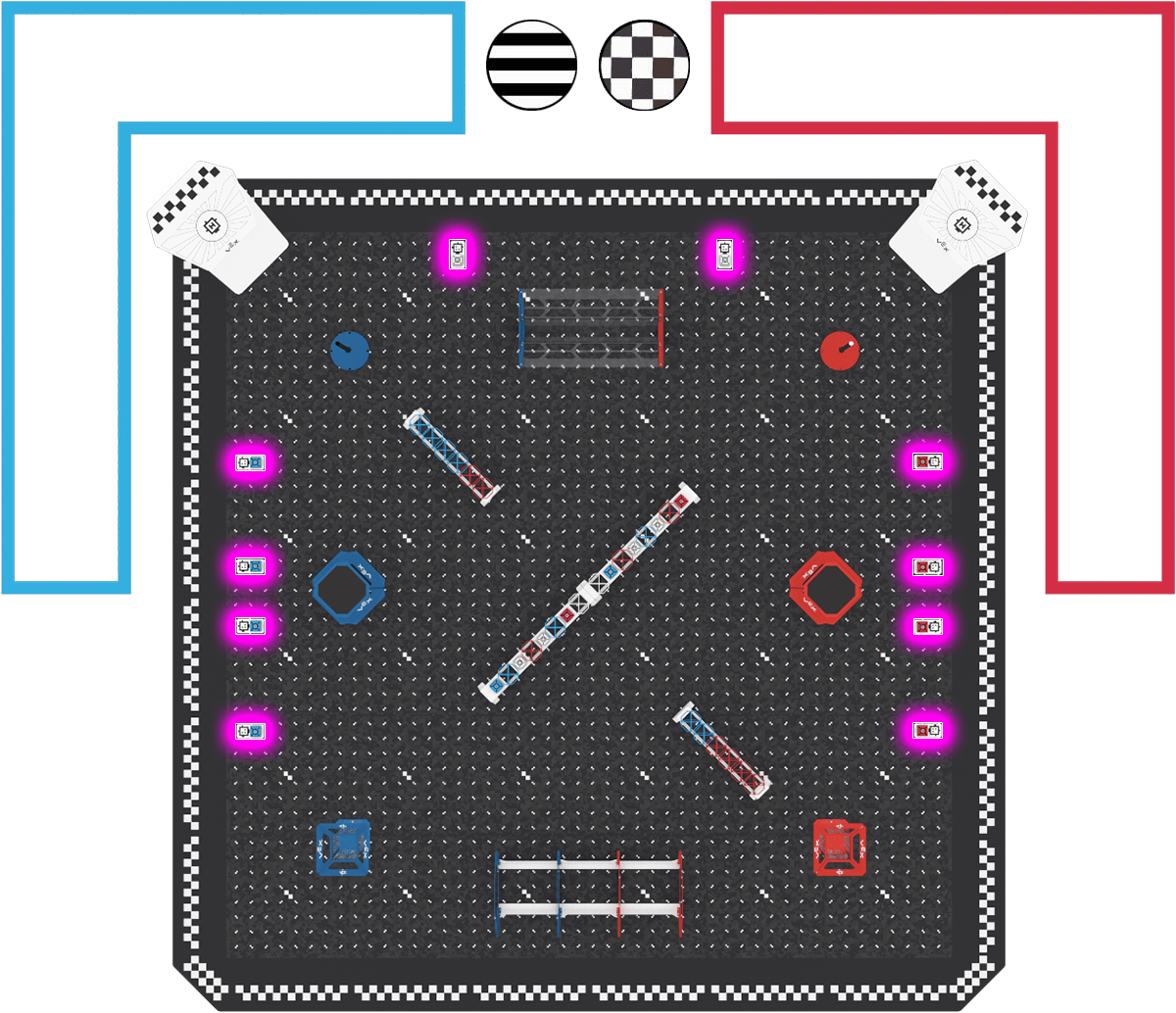
Figure FO-1: Top down image of the Field showing recommended locations for where Head Referee (black and white stripes), Scorekeeper Referees (black and white checkerboard), and Flight Team Members (red and blue) should stand. Scoring ObjectsSection titled “Scoring Objects”
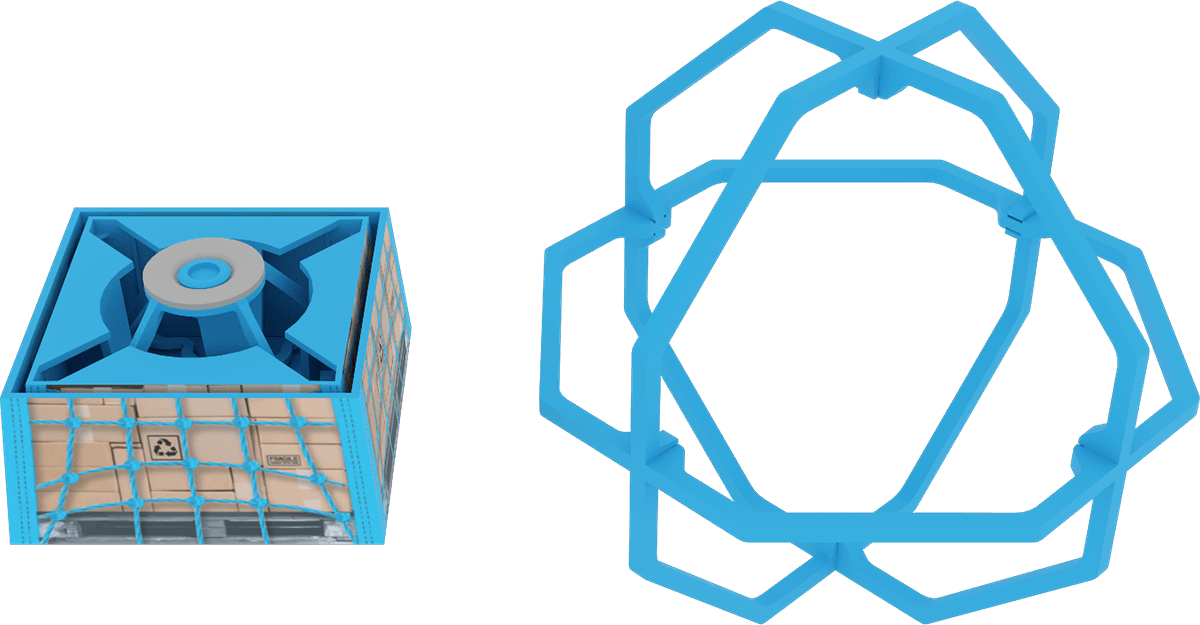
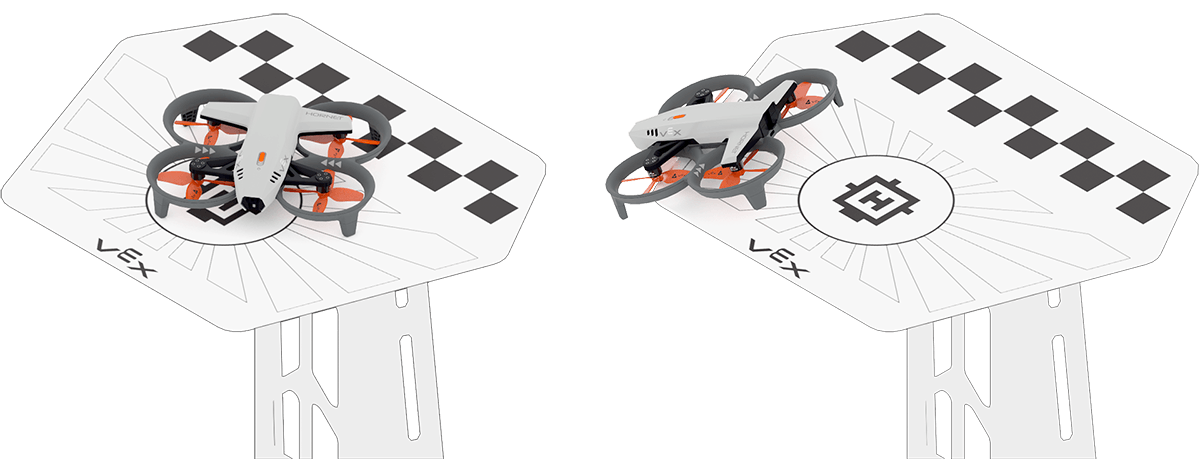
Figure FO-2: A Blue Cargo and Blue Orbit Ball.
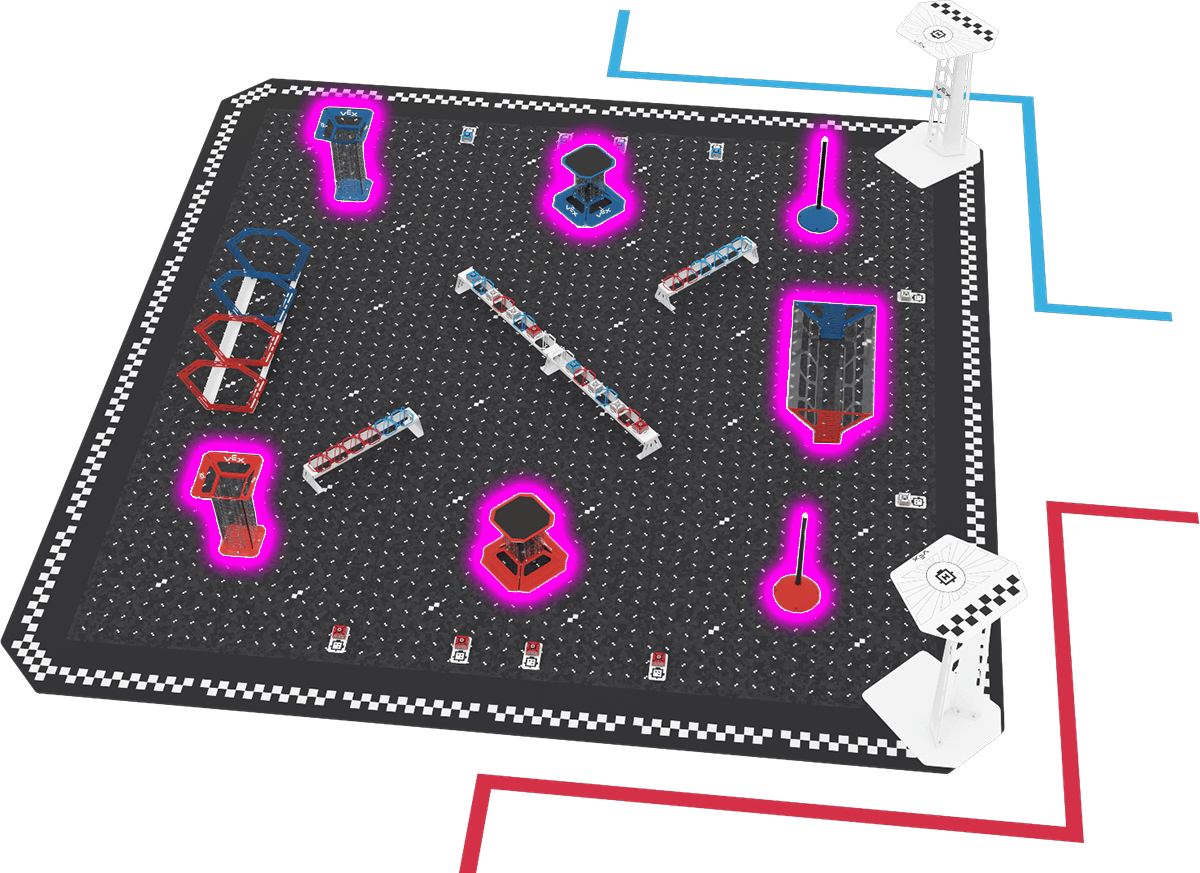
Figure FO-3: Side view of the Field with the seven Goals highlighted in pink. Other Field ElementsSection titled “Other Field Elements”
Figure FO-4: A side view of the Field showing the location of the two Short Racks and one Long Rack highlighted in pink.
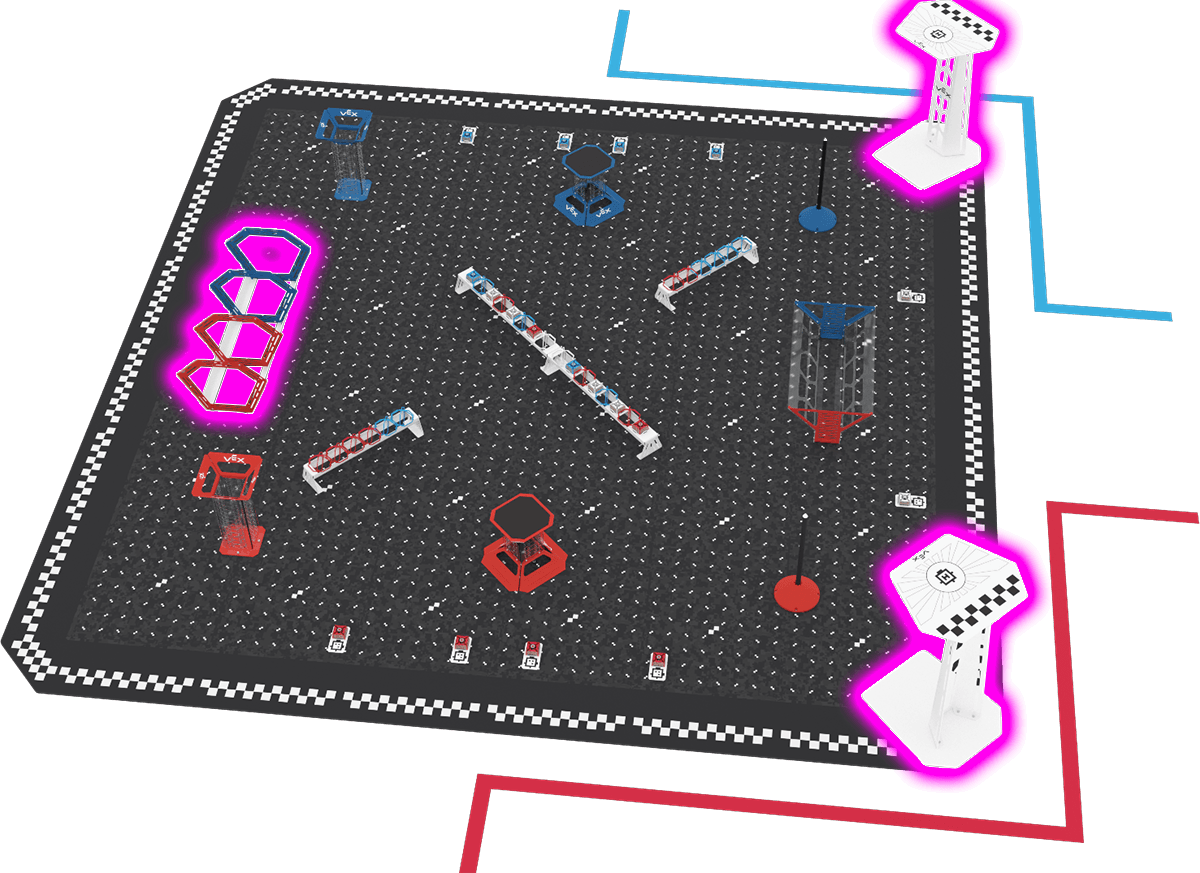
Figure FO-5: A side view of the Field showing the location of the two Field Platforms and the Ring Tunnel highlighted in pink.
Figure FO-6: A top-down view of the Field showing the location of the 10 Cargo Tile Plates highlighted in pink. Section 3 - Scoring & RulesScoringSection titled “Scoring”How many points each action is worth depends on the Scoring System in effect. There are six, named A to F (Table SC-1). What counts as Scored never changes; only the point values do. System A is the baseline, and Systems B to F each reward a different part of the game more. Check the Scoring System before each Match and adjust your plan. Table SC-1: Scoring Systems
▲ = more points than System A. ▼ = fewer points than System A. Values without a mark are the same as System A. <SC1> All scoring statuses for Scoring Objects, Goals, and Landed Drones are evaluated after the Match ends. Referees score once everything on the Field has stopped moving.
<SC2> Scoring status for Ring Tunnel Passes is evaluated during the Match. Referees count each Ring Tunnel Pass as it happens, up to two per Match. It doesn’t matter which Drone makes it. <SC3> All scoring statuses are evaluated visually by a Head Referee.
What Counts as ScoredSection titled “What Counts as Scored”Rules SC4 to SC12 explain what counts as Scored: when a Scoring Object is Scored in or on a Goal, when a Ring Tunnel Pass counts, when a Drone is Landed, and when bonuses are awarded. These criteria are the same under every Scoring System. <SC4> Orbit Ball Scored on the Pole Goal. An Orbit Ball is Scored on a Pole Goal if:
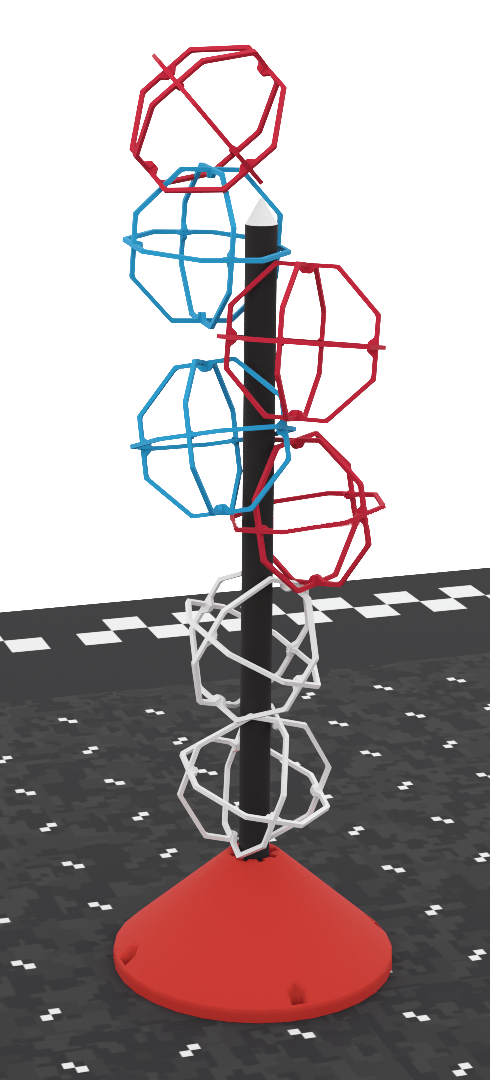
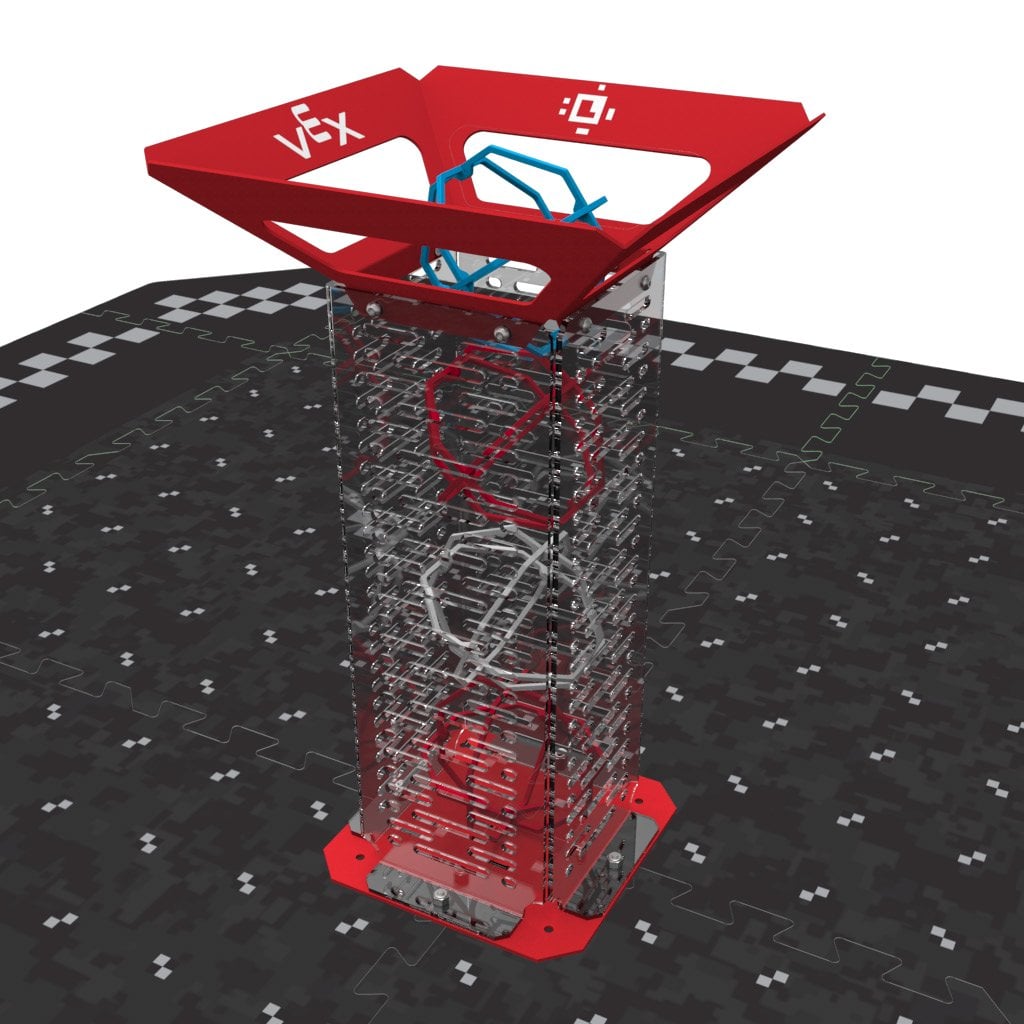
Figure SC4-1: The top Red Orbit Ball is not Scored because the Pole is not inside it. All other Orbit Balls are Scored. <SC5> Orbit Ball Scored in the Drop Tower Goal. An Orbit Ball is Scored in a Drop Tower Goal if:
Figure SC5-1: All four Orbit Balls are Scored because each is at least partly inside the Goal. <SC6> Orbit Ball Scored in the Drop Zone Goal. An Orbit Ball is Scored in the Drop Zone Goal if:
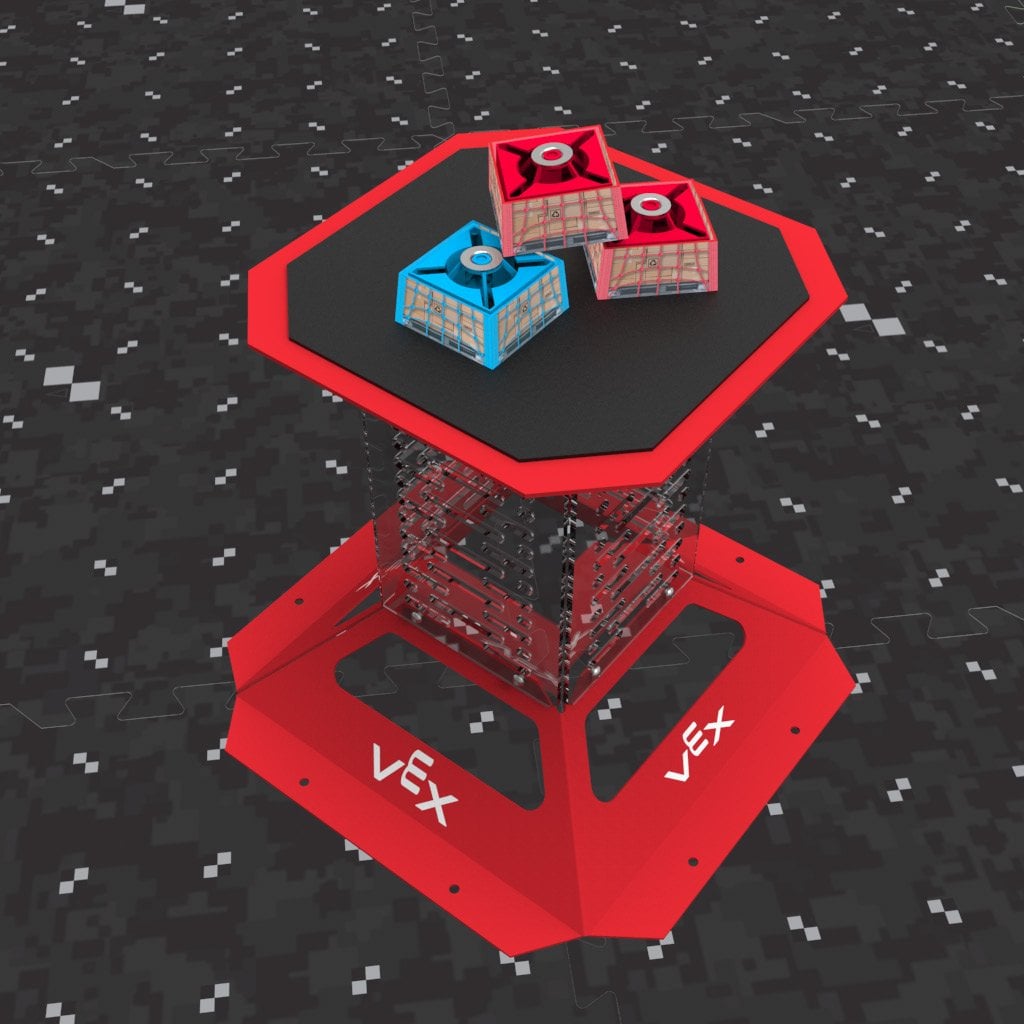
Figure SC6-1: All seven Orbit Balls are Scored because each is at least partly inside the Goal. <SC7> Cargo Scored on the Cargo Platform Goal. Cargo is Scored on a Cargo Platform Goal if:
Figure SC7-1: All of this Cargo is Scored because each piece is held up by the Goal or by Scored Cargo. <SC8> White Scoring Objects are wildcards. A White Scoring Object counts as matching the color of any Goal it is Scored in. <SC9> Ring Tunnel Pass criteria (maximum two per Match). A Drone completes a Ring Tunnel Pass if:
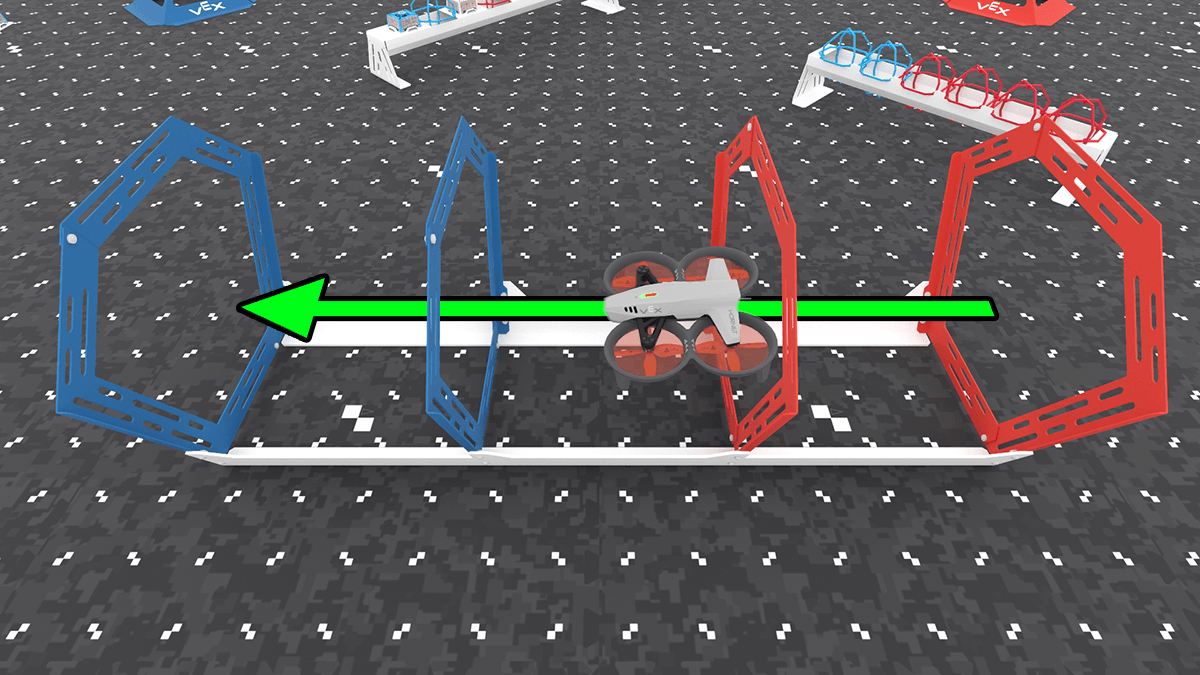
Up to two Ring Tunnel Passes count per Match. One Drone may complete both.
Figure SC9-1: A Drone completing a Ring Tunnel Pass. <SC10> Drone Landed on a Field Platform. A Drone is Landed if:
Figure SC10-1: A comparison of a Drone on the Platform and considered Landed (the left image) and a Drone partially on the Platform and not considered Landed (the right image) <SC11> Obstacle Completion Bonus criteria. At the end of the Match:
<SC12> Goal Bonus criteria. A Goal Bonus is awarded for each Goal that has at least one Scored Scoring Object at the end of the Match.
Scoring SystemSection titled “Scoring System”<SC13> One Scoring System is in effect for each Match.
Specific Game RulesSection titled “Specific Game Rules”<SG1> Starting a Match. Before the Match starts, each Drone must be:
Violation Notes:<SG2> Keep Scoring Objects in the Field. Any Scoring Object that leaves the Field, on purpose or not, stays out for the rest of the Match. <SG3> A Drone may carry or control an unlimited number of Scoring Objects. Safety RulesSection titled “Safety Rules”Safety comes first at all VEX Robotics Competitions. These rules apply at all times, on and off the Field. <S1> Be safe out there. Everyone at an event must follow the Global Robotics and Science Foundation Safety Policy. Students must stay off the Field Tiles at all times. Only the Head Referee or another event staff member may enter the Field. If a Team acts unsafely, or damages the Field, a Field Element, or a Scoring Object, the Head Referee may give a Disablement and/or Disqualification. <S2> Students must be accompanied by an Adult. Every Student must be supervised by a responsible Adult who stays for the whole event in case of an emergency. The Adult must follow all rules, including the Student-Centered Policy (G2). Breaking this rule can lead to removal from the event. <S3> Drones stay inside the Field. If a Drone approaches the edge of the Field during a Match, the Head Referee will give a warning. If the Drone leaves the Field, the Head Referee triggers an E-Stop. A Drone that ends up outside the Field after being warned always receives a Disablement and may not fly again that Match. It may be retrieved once the Head Referee says it is safe. <S4> Wear safety glasses. All Flight Team Members wear eye protection at the Field. Safety glasses with side shields and shatterproof lenses are recommended. <S5> Hands away when propellers are spinning. If any Drone in the Match is flying or has spinning propellers, no one may touch any Drone, including their own. Wait until all Drones are in Prop Lock (GG11). Everyone steps clear before any Drone is released from Prop Lock. Violation Notes:
<S6> Controllers are tethered to whoever is flying. Every Controller has a lanyard attached. Whoever holds the Controller wears the lanyard whenever the Drone is out of Prop Lock, and before the Drone is released from Prop Lock or takes off. The lanyard from the kit or any other lanyard may be used.
Violation Notes:
General RulesSection titled “General Rules”These rules point to Global Robotics and Science Foundation policies: the Code of Conduct, the Student-Centered Policy, and the Student Eligibility Policy. Where this manual summarizes them, the policy itself is the final word. Report a suspected Violation of any General Rule to the Judge Advisor, Head Referee, or Event Partner. After an investigation with the Global Robotics and Science Foundation and VEX Robotics, the Team may be removed from Matches, lose its Drone Skills scores, and/or lose eligibility for judged awards. Each case is reviewed individually. <G1> Participants must follow the Code of Conduct. Everyone at an event follows the Code of Conduct. Violation Notes:
<G2> Participants must follow the Student-Centered Policy. Everyone at an event follows the Student-Centered Policy. Violation Notes:
<G3> Use common sense. When reading and applying the various rules in this document, please remember that common sense always applies in the VEX AIR Drone Competition.
<G4> Students must meet the Student Eligibility Policy requirements. All Student participants must fall within the eligibility requirements set forth in the Student Eligibility Policy for their respective program and have a completed participant release form on file for the event and season. Violation Notes:
<G5> There is a difference between accidentally and willfully violating a Drone rule. A Team that breaks a Drone rule, on purpose or not, can’t play until its Drone passes inspection (D4). Breaking Drone rules on purpose to get an advantage goes against the spirit of the competition and will result in Disqualification. Violation Notes:
General Game RulesSection titled “General Game Rules”<GG1> Flight Team Members fly their Drones, and stay in the Flight Station. Each Team may have up to three Flight Team Members in its Flight Station. They stay there for the whole Match, unless they are handling their Drone under GG11. Only Flight Team Members may be in the Flight Station during a Match. Adults may not, except event staff. During a Match, a Drone may be flown only by its Flight Team Members and/or the Drone’s own code. Violation Notes:
<GG2> A Team’s Drone should attend every Match. A Team’s Drone must come to the Field for each of its scheduled Matches, even if the Drone doesn’t work. If the Drone isn’t at the Field when the Match starts, the Team is a “no-show” and gets zero points. Its partner still plays and scores (see GG12d).
<GG3> Drones on the Field must be ready to play. A Drone placed on its Field Platform must be ready to go, with a charged Battery and ready for takeoff.
<GG4> Flight Team Members must be Fit to Fly. Flight Team Members in the Flight Station must be Fit to Fly: focused, ready, calm, safe, prepared, and aware (see the Glossary).
<GG5> Hands out of the Field. Flight Team Members may not touch Scoring Objects or Field Elements on purpose during a Match. Raise any concerns about the Field setup with the Head Referee before the Match. Never adjust Scoring Objects or Field Elements yourself. <GG6> Controllers must stay paired with the Field Control System. Before the Match, the Head Referee pairs each Controller to the Field Control System. The Controller stays paired until it is turned off or the Head Referee disconnects it in the software. Keep your Controller on until the Head Referee gives the all-clear. A Drone whose Controller isn’t paired may not take off. Violation Notes:
<GG7> Match Replays are allowed, but rare. The Event Partner and Head Referee may replay a Match (play it again from the start) only in extreme cases, such as:
A Drone that never becomes airborne through its own fault does not warrant a replay; the Match plays as normal, unless the Event Partner and Head Referee find the venue or Field at fault. A replayed Match is scored under the Scoring System of its original Round (see <T10f>). <GG8> Disqualifications. A Team Disqualified in a Qualification Match gets zero points for that Match. Its partner still gets the Alliance’s points.
<GG9> Drones hover at the end of the Match. At 0:00, the Field Control System holds every flying Drone in a hover, unless its Pilot has already triggered landing from the Controller. After the Head Referee checks which Drones are Landed (SC10), they unlock the hovering Drones so Pilots can fly them back and land them on the Field Platforms safely. Event staff can also force a Drone to land from the event software. Don’t touch your Drone or turn off your Controller until the Head Referee has scored the Field and given the all-clear (GG6). <GG10> Downed Drones wait until all Drones are in Prop Lock. A Downed Drone stays where it is until all Drones in the Match are in Prop Lock. The first time that happens, a Timeout starts (GG12) and the Team may retrieve the Drone. If the Drone is not safely reachable from outside the Field, the Head Referee or event staff may retrieve the Drone for the Team (GG11). After the Timeout, the Drone may be retrieved whenever all Drones are in Prop Lock again, but the clock keeps running (GG12a). <GG11> Handling the Drone mid-Match is allowed only under certain circumstances. Flight Team Members may leave the Flight Station to handle their Drone only when all Drones in the Match are in Prop Lock, and either a Timeout is running (GG12) or the Head Referee has confirmed that all Drones are locked (GG12a). If the Drone is not safely reachable from outside the Field, the Head Referee or event staff may retrieve the Drone for the Team. While handling a Drone:
Violation Notes:
<GG12> Timeouts start automatically. The first time all Drones in the Match are in Prop Lock, the Field Control System starts a Timeout.
Section 4 - Drone Skills ChallengeOverviewSection titled “Overview”In a Drone Skills Match, one Team flies one Drone for ninety seconds (1:30), always under Scoring System A. In a Piloting Skills Match, the Pilot flies the Drone. In an Autonomous Skills Match, the Drone’s code flies it. A Team’s Skills ranking uses its best Match of each type (T20). Drone Skills Matches are optional, but they may count toward some awards and global Skills rankings. At Tournaments, a Team must play its scheduled Qualification Matches to play Skills Matches (T17). Drone Skills Match RulesSection titled “Drone Skills Match Rules”<DSC1> Standard rules apply in most cases. All other rules apply to Drone Skills Matches unless this section says otherwise. GG, SG, and DSC Violations in a Skills Match only affect that Match and don’t count toward repeated Violations at the event. <DSC2> One Team, one Drone. A Drone Skills Match is played by one Team with one Drone and up to three Flight Team Members. GG1 applies, except that in Autonomous Skills Matches, Flight Team Members may move around the outside of the Field. <DSC3> Scoring Drone Skills Matches. Skills Matches use the standard Scoring Rules (SC1 to SC12) under Scoring System A (T19).
<DSC4> Drone and Field setup. The Field is set up the same as for Teamwork Matches. The Drone may start on, and Land on, either Field Platform (SC10). <DSC5> Handling the Drone is allowed, but the clock runs. Flight Team Members may handle their Drone any time it is in Prop Lock (S5). GG11 applies, with the Skills Drone as the only Drone in the Match.
<DSC6> Piloting Skills Matches. Flight Team Members fly the Drone and stay in the Flight Station, except when handling the Drone under DSC5. <DSC7> Autonomous Skills Matches. The Drone flies only on its own code, using its sensors and pre-programmed commands.
<DSC8> Skills Stop Time. A Team may end its Skills Match early to record a Skills Stop Time, which is used as a ranking tiebreaker (T20). It doesn’t change the score.
Section 5 - The DroneOverviewSection titled “Overview”All Drones must pass inspection before they compete. Inspections usually happen during check-in and practice. Use these rules to check your own Drone before you arrive. Inspection RulesSection titled “Inspection Rules”<D1> Each Team competes with its own Drone. Each Team needs its own Drone that has passed inspection. A Team may bring a second Drone (or more) to the event, but it may not be shared with or used by another Team. Only one of a Team’s Drones may be powered on, paired, or connected to the Field Control System during a Match.
<D2> Teams must use the VEX Robotics AIR Competition Drone and official accessories.
<D3> Drones and Controllers must be updated to the latest firmware. Drones and Controllers must run the latest firmware to pass inspection and compete. <D4> Drones must pass inspection. A Drone must pass a full inspection before it competes. A Drone found breaking a Drone rule at the Field is removed from Matches or Disqualified until it is fixed.
<D5> One Battery at a time. A Drone may use only one official VEX AIR Drone Battery at a time. <D6> One Module at a time. A Drone may use only one official VEX AIR Drone Module at a time. <D7> Drone LED Status Indicator must remain visible at all times. Don’t cover the LED Status Indicator next to the power button. <D8> Officially registered Team numbers must be displayed on Drone. Register on events.vex.com to get your VEX AIR Team Number. Display it clearly on top of the Drone, using the Team Number stickers from your welcome kit, a marker, or custom stickers. <D9> Officially registered Team numbers must be set in the Controller. Before each Match, the Team Number in your Controller must match your registered Team Number, so the Field Control System and the event software can identify your Drone.
<D10> Decorations are allowed. Decorations must not affect how the Drone performs or how a Match turns out, and must fit the spirit of the competition. They can’t cover the LED Status Indicator (D7) or the Team Number (D8). Inspectors and Head Referees decide what counts as a decoration. <D11> Fly with undamaged propellers, propeller guards, and Landing Feet. Propellers and propeller guards (nacelles) wear down with normal flying. Damage alone doesn’t fail inspection, but Teams should fly with undamaged parts whenever they can.
Section 6 - The EventOverviewSection titled “Overview”This section explains how Tournaments run and how Teams are ranked and advance. A typical Tournament has Practice Matches, Qualification Matches played in Rounds, Alliance Selection, and Finals Matches, with Drone Skills Matches running alongside. Leagues are covered in Section 7. Tournament RulesSection titled “Tournament Rules”<T1> Head Referees have ultimate and final authority on all gameplay and Drone ruling decisions during an event.
<T2> Head Referees must be qualified. A VEX AIR Head Referee must have this season’s VEX AIR Head Referee certification, be at least eighteen years old, and have no conflict of interest with any Team at the event. <T3> Flight Team Members are permitted to immediately appeal the Head Referee’s ruling. Right after the Match, before scores are final, Flight Team Members may politely ask for a review. Once the Head Referee says the decision is final, the matter is closed. Not accepting a final decision may break G1. <T4> The Event Partner has ultimate authority regarding all non-gameplay decisions during an event, such as schedules, the venue, volunteers, and logistics. The Event Partner can’t overrule the Head Referee on gameplay or Drone rulings. <T5> Be prepared for minor Field variance. Fields may differ slightly from each other and from the official specifications. Raise setup concerns with the Head Referee before the Match (GG5). <T6> Fields and Field Elements may be repaired at the Event Partner’s discretion. Repairs should bring the Field as close to specification as possible and must not affect gameplay. <T7> Fields at an event must be consistent with each other. If an event has more than one Teamwork Match Field, they must all have the same modifications and repairs. <T8> Qualification Matches follow the official Match Schedule. The Match Schedule lists each Team’s Qualification Matches, partners, and expected start times. The Event Partner may adjust it and will announce any changes.
<T9> Every Team plays the same number of Qualification Matches.
<T10> Scoring Systems rotate by Round and are revealed at the start of each Round.
<T11> Teams are ranked by their average Qualification Match score.
<T12> Qualification ranking tiebreakers. Teams with the same average are ranked by:
<T13> Alliance Selection. After the last Qualification Round, the top-ranked Teams form Alliances of two Teams for the Finals.
<T14> Half of the Teams at an event advance to the Finals Matches.
<T15> Finals Matches decide the Tournament Champions. All Finals Matches make up one Round, the Finals Round, and each Alliance gets one score.
<T16> Ties in Finals Matches lead to limited rematches. If two or more Alliances tie for the highest score:
<T17> Skills Match schedule. Drone Skills Matches are played on open Skills Fields, first come first served or through a sign-up published by the Event Partner. A Team must play its scheduled Qualification Matches to play Skills Matches.
<T18> Skills Fields must be consistent with each other. Skills Fields don’t need the same modifications as Teamwork Match Fields, but every Skills Field at an event must be set up the same way. <T19> Drone Skills Matches are always played under Scoring System A. This keeps Skills scores comparable across every event in the season. <T20> Skills rankings. A Team’s Skills score is its highest Piloting Skills Match score plus its highest Autonomous Skills Match score at the event.
<T21> League events. Leagues are Tournaments played across multiple sessions. They follow these Tournament Rules as adjusted by the League Rules in Section 7 (L1 to L7). Section 7 - LeaguesOverviewSection titled “Overview”A league is a Tournament played over several sessions on different days (L1). This section lists everything that changes in a league. If a League Rule differs from another rule, the League Rule applies at the league. Matches are flown and scored the same way as at any Tournament. League RulesSection titled “League Rules”<L1> Leagues are Tournaments played across multiple sessions. A league has several ranking sessions on different days, then a League Finals session with Alliance Selection and Finals Matches. It is one event, under one Event Partner, with one ranking carried through all sessions.
<L2> League structure. A league has at least three ranking sessions, at least one week apart, followed by a League Finals session.
<L3> Drones are inspected at every session. A Drone passes full inspection (D4) before its first league Match, and again at every later session it attends. <L4> Rounds and Scoring Systems continue across sessions. Rounds are numbered straight through all sessions, and T10c applies to the whole league. The Scoring System order carries over from session to session and never restarts.
<L5> League rankings. Teams are ranked by their average Qualification Match score (T11a). Teams that play in less than sixty percent of the Qualification Matches available rank below Teams that play in at least sixty percent.
<L6> Drone Skills Matches at leagues. At each ranking session, a Team must play its scheduled Qualification Matches to play Skills Matches (T17).
<L7> The League Finals session. Alliance Selection and Finals Matches happen at the League Finals session under T13 to T16, with these changes:
Appendix A - Field SpecificationsThis appendix will hold the complete Field reference:
This appendix names the four sides of the Field. Figure FO-1 shows the Flight Station side at the top.
The two corners on the Flight Station side are the Blue corner and the Red corner.
Figure FO-1, from Section 2: where the Head Referee, Scorekeeper Referees and Flight Team Members stand. Bill of Materials – coming soonSection titled “Bill of Materials – coming soon”More details are coming soon. Scoring Object Starting PositionsSection titled “Scoring Object Starting Positions”Set up the Field the same way before every Match. All 38 Scoring Objects start on a Rack or a Cargo Tile Plate. None start on the Field Tiles, in a Goal, or on a Drone. Table A-1: Where Scoring Objects start
Long RackSection titled “Long Rack”The Long Rack Goal runs diagonally across the center of the Field. It holds 16 Scoring Objects total, eight on each side of its center support. Figure A-1 shows the layout of Scoring Objects starting with the end nearest the Blue Cargo Platform Goal.
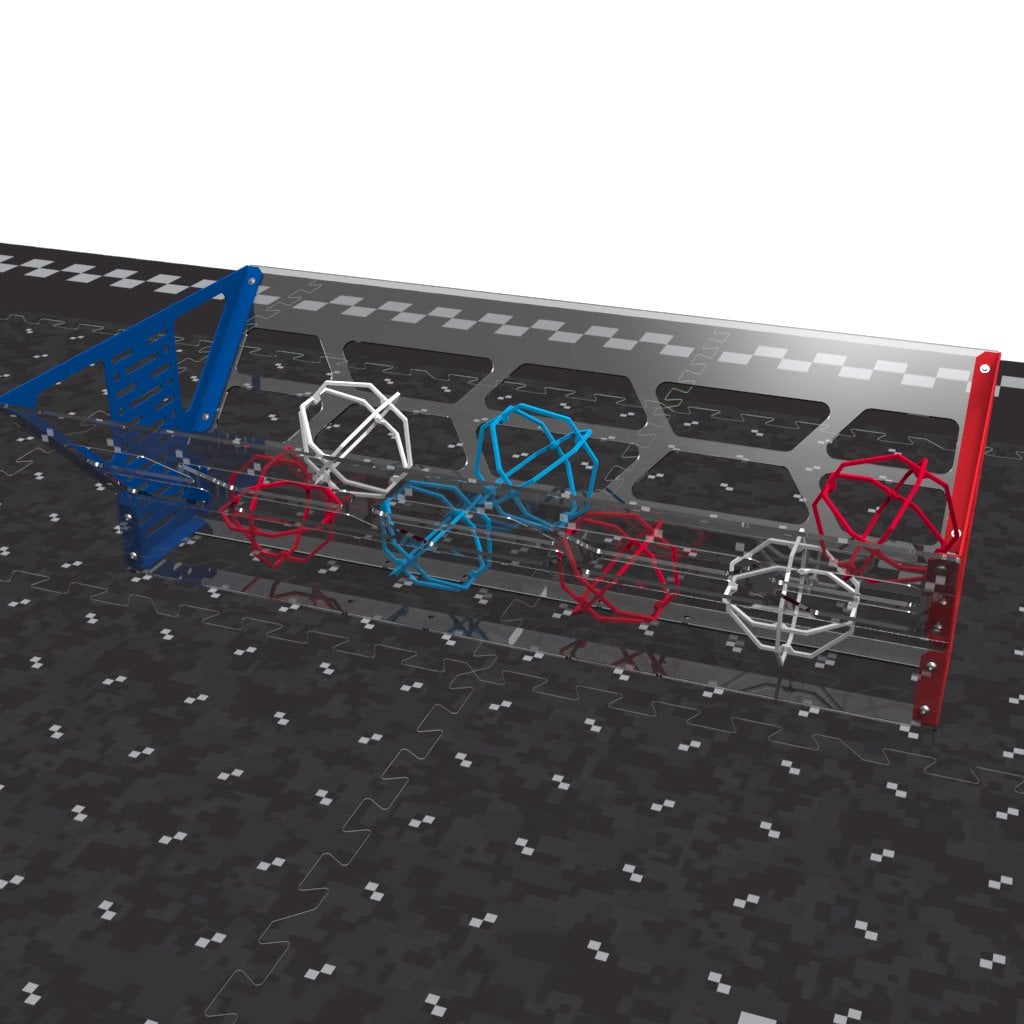
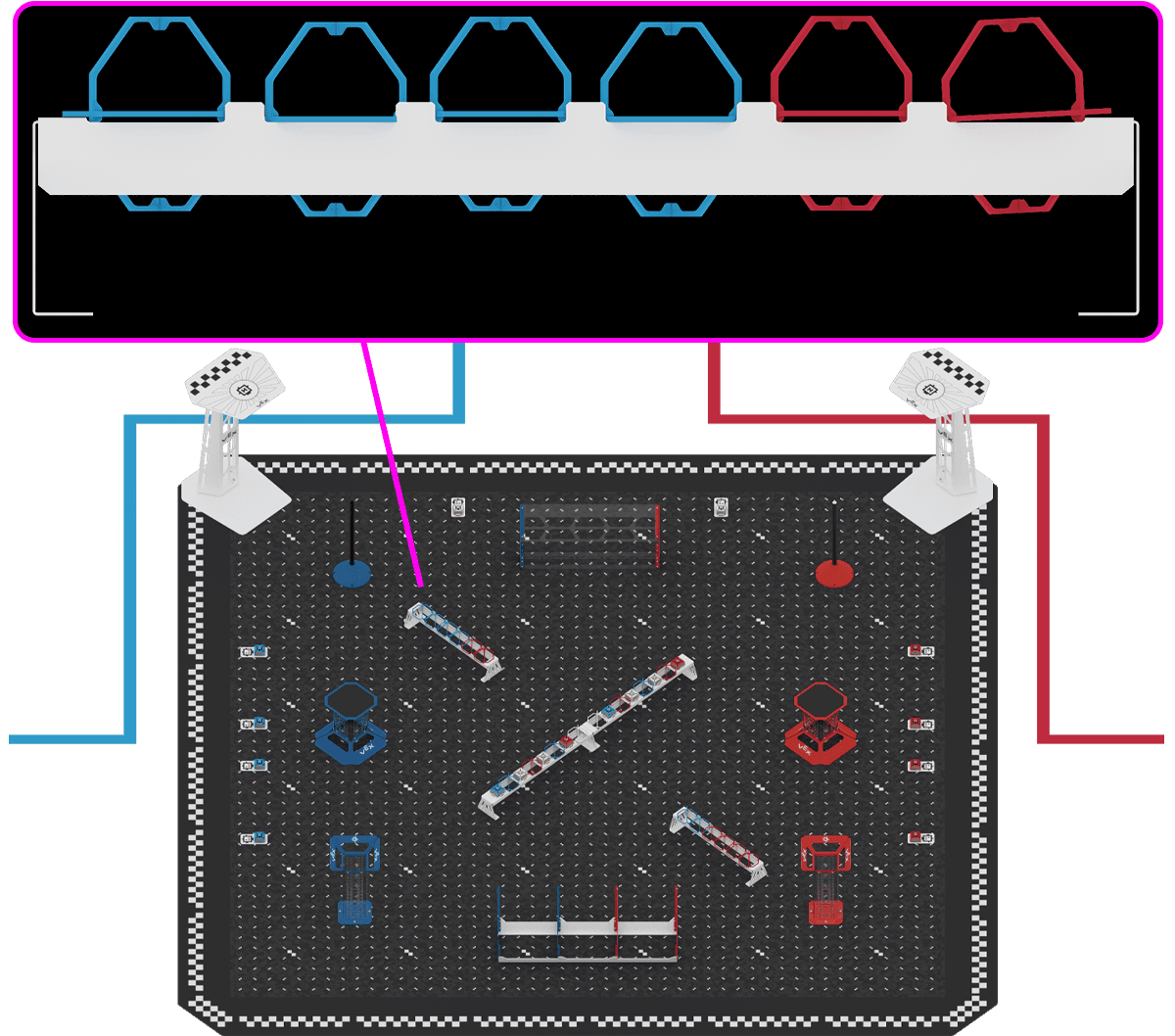
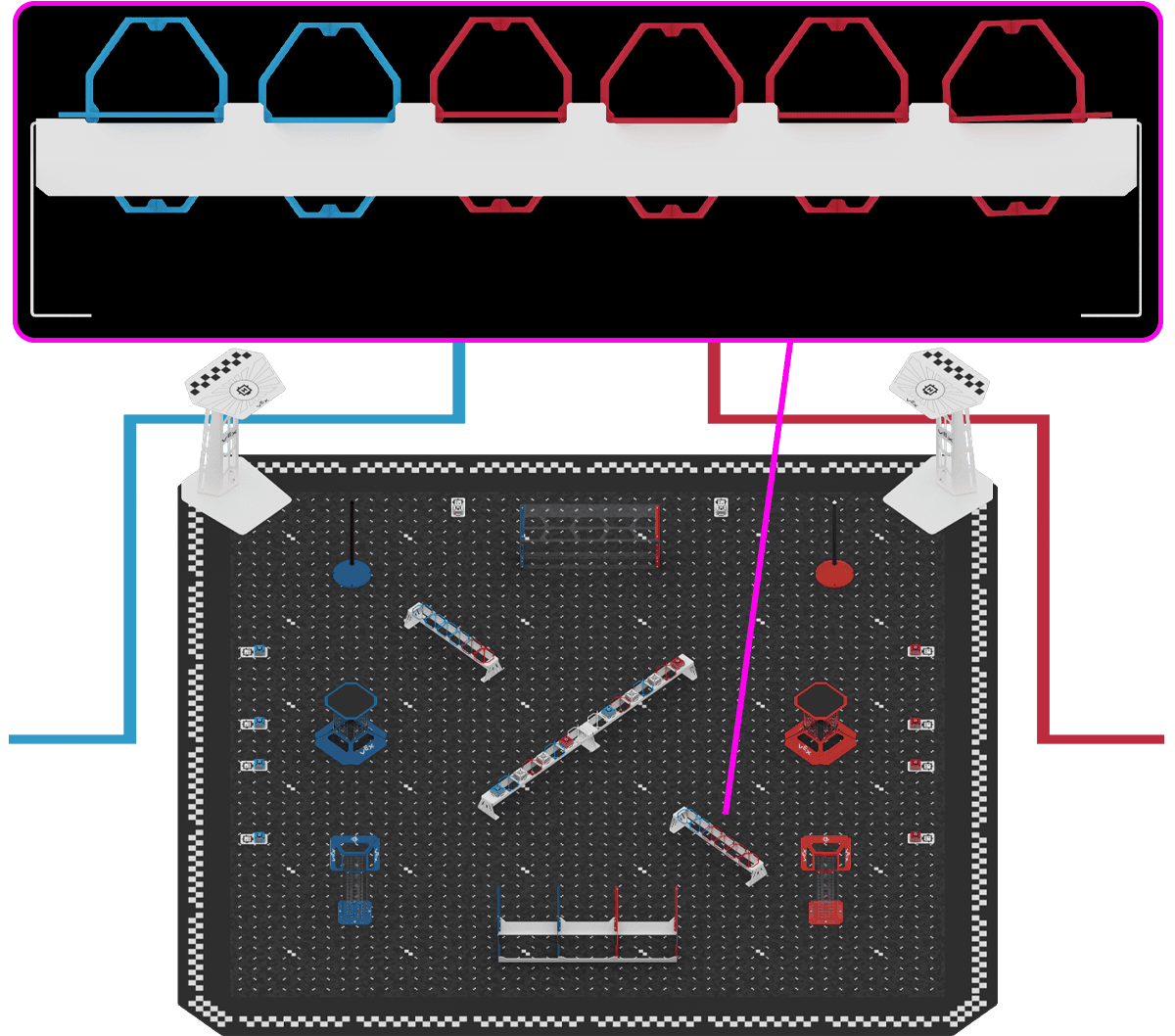
Figure A-1: From left to right the Scoring Objects in order are: Blue Cargo, Blue Orbit Ball, White Cargo, Red Orbit Ball, White Cargo, Blue Orbit Ball, Red Cargo, two White Orbit Balls, Blue Cargo, Red Orbit Ball, White Cargo, Blue Orbit Ball, White Cargo, Red Orbit Ball, Red Cargo. Short RackSection titled “Short Rack”Each Short Rack holds six Orbit Balls and no Cargo.
Figure A-2: A close-up of the Blue-side Short Rack showing the Orbit Balls in order above an image of the full Field, with a pink line connecting the close-up to the Blue-side Short Rack on the Field.
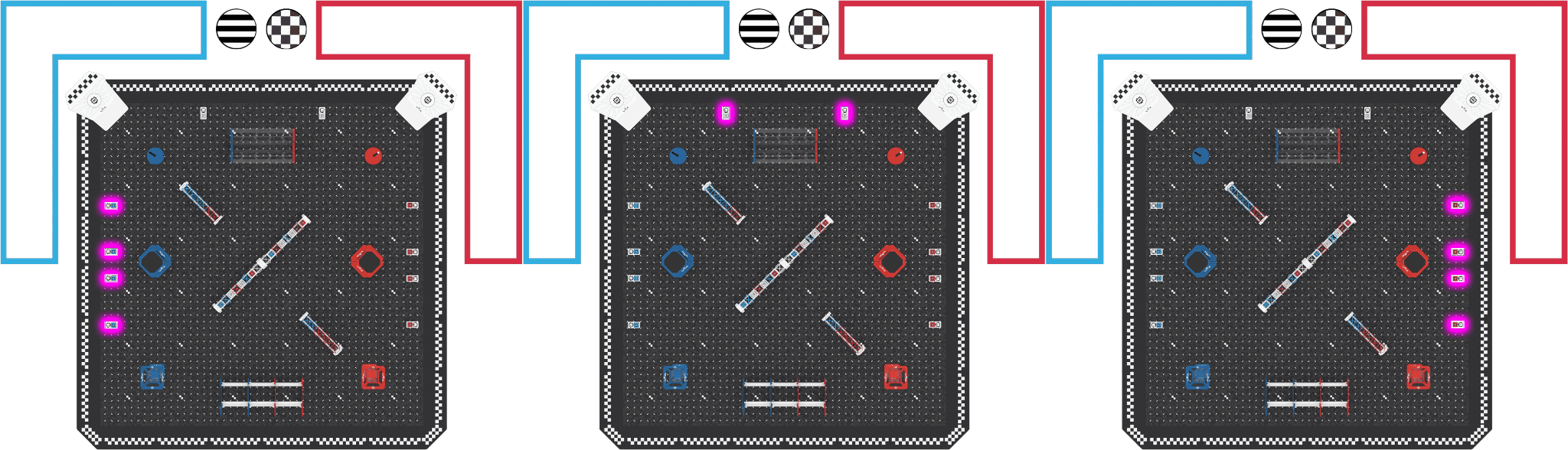
Figure A-3: A close-up of the Red-side Short Rack showing the Orbit Balls in order above an image of the full Field, with a pink line connecting the close-up to the Red-side Short Rack on the Field. Cargo Tile PlatesSection titled “Cargo Tile Plates”Each Cargo Tile Plate holds one Cargo. The organization of the Cargo is described below and shown in Figure A-4.
Figure A-4: Three Field images side by side showing each set of Cargo Tile Plates highlighted in pink. From left to right the Blue side, Flight Station side, and Red side are shown. Field Construction and DimensionsSection titled “Field Construction and Dimensions”Full VEX AIR Competition Pick & Drop Field build instructions can be found at this link. A CAD (.STEP) file of the Pick & Drop Field can be downloaded using this link. More details are coming soon. Venue Guidance – coming soonSection titled “Venue Guidance – coming soon”More details are coming soon. Appendix B - GlossaryAdult - Anyone who isn’t a Student or another defined role, such as a Head Referee. Alliance - Two Teams playing a Match together. Alliances are random in Qualification Matches and chosen during Alliance Selection for Finals Matches (T13). Alliance Captain - A Team that invites another Team to join its Alliance during Alliance Selection (T13). Alliance Score - The points scored in a Match, shared by both Teams on the Alliance. Alliance Selection - When Alliances for the Finals Matches are formed, after the Qualification Matches (T13). Border - The outer edge of the Field: twenty-four Border foam tiles and four corner foam tiles. Cargo - A cube-shaped Scoring Object. See Field Overview. Cargo Tile Plate - A plate on a Field Tile that holds one Cargo at the start of the Match. There are ten. Controller - The official VEX AIR Drone Controller a Pilot uses to fly a Drone. It must stay paired with the Field Control System during a Match, and whoever holds it wears its lanyard (S6, GG6, D9). Disablement - The penalty for a safety Violation. The Head Referee tells the Team to land, put the Drone in Prop Lock, and set their Controllers on the ground, and the Drone sits out the rest of the Match. If the Team doesn’t comply, event staff can force the Drone to land from the event software. A Disablement is not a Disqualification. Disqualification - The penalty for a Major Violation. The Head Referee tells the Team at the end of the Match, and the Team scores zero for it (GG8). Repeated Violations or Disqualifications can get a Team Disqualified from the whole event. Downed - A Drone that can’t keep flying (crashed, flipped, or failed) and has gone into Prop Lock on its own (GG10, GG12). Drone - An official VEX Robotics AIR Competition Drone: the airframe plus a legal battery, module, motors, and propellers. Emergency Stop (E-Stop) - A control that immediately shuts off the Drone’s motors to stop flight during an unsafe or unexpected situation. A Drone that is E-Stopped receives a Disablement, unless the Head Referee decides otherwise based on the conditions at the Field and what led to the E-Stop. The Head Referee can only make that call if the Drone comes to rest inside the Field. See S3. Event Partner - The volunteer who runs the event, including its volunteers, venue, and materials (T4). Field - The whole playing area: the Field Tiles and the Border. Field Control System - The event’s hardware, software, and network that runs Matches. It starts and ends Matches, starts Timeouts, turns Drone motors on and off, and tracks each Drone’s Prop Lock status. Event staff use it through the event software, and can force a Drone to land or put all Drones in Prop Lock. Controllers must stay paired with it, and Drones must stay connected to it (GG6, D1). Field Element - The Field, Goals, Racks, Field Platforms, and their supporting structures. Field Platform - Where a Drone takes off at the start of the Match and may land at the end. Field Tiles - The flat inside of the Field: thirty-six foam tiles, six by six. Fit to Fly - Ready to fly safely. A Flight Team Member who is Fit to Fly is Focused (paying attention, not distracted), Ready (understands the task), Calm (not rushed, frustrated, or overly excited), Safe (following all safety rules), Prepared (has finished the pre-flight checklist), and Aware (the takeoff and landing zones are clear). See GG4. Flight Station - The area beside the Field where Flight Team Members stand during their Match, shown by the red and blue lines in Figure FO-1. Flight Team Member - A Student in the Flight Station during a Match. Adults can’t be Flight Team Members. Game Design Committee - The creators of Pick & Drop and authors of this manual. It is the only official source of rules clarifications and Q&A answers. Goal - A place where Scoring Objects are Scored. There are four types: Drop Tower, Drop Zone, Cargo Platform, and Pole Goal. See Field Overview.
Figure G-1: A Drop Tower Goal
Figure G-2: A Drop Zone Goal
Figure G-3: A Cargo Platform Goal
Figure G-4: A Pole Goal Goal Bonus - Points for each Goal with at least one Scored Scoring Object at the end of the Match (SC12). Head Referee - A certified, impartial volunteer who enforces the rules. Only a Head Referee may discuss rulings or scores with Teams. Large events may have more than one (T1, T2). Landed - A Drone that meets SC10. Major Violation - A Violation that leads to a Disqualification. Score Affecting Violations are Major unless a rule says otherwise. A rule can also make serious, deliberate, or strategic Violations Major. Several Minor Violations in one Match or event can add up to a Major Violation. Match - A timed period of play. There are six types of Match:
Match Schedule - The list of Qualification Matches, with Alliances and expected start times (T8). Minor Violation - A Violation that does not lead to a Disqualification. Accidental, brief, or non-Score Affecting Violations are usually Minor. The Head Referee usually gives a verbal warning during the Match so the Team can fix it before it becomes Major. Module - An official VEX AIR attachment for the Drone: Passive, Motorized, or Magnetic. Obstacle Completion Bonus - A bonus for completing a Ring Tunnel Pass and Landing a Drone in the same Match (SC11). Orbit Ball - A ball-shaped Scoring Object. See Field Overview. Pilot - The Flight Team Member flying the Drone. Propeller Lock (Prop Lock) - A safety feature on the VEX AIR Drone that prevents the propellers from spinning until the Pilot is ready to fly. When the Propeller Lock is engaged, it prevents the motors and propellers on the Drone from turning. All flight commands are ignored, and the LEDs on the Drone and Controller will blink blue. A Drone enters Prop Lock on its own when it is Downed or moved while not flying, when the Field Control System locks it, or when a Flight Team Member presses the Controller’s Prop Lock button. Drones may only be handled while Prop Lock is engaged (S5, GG11). Rack - A Field Element that holds Scoring Objects at the start of the Match. See Field Overview. Ring Tunnel - Four Rings that Drones fly through. See Field Overview. Ring Tunnel Pass - Flying through all four Rings in order without touching the Field Tiles. Up to two count per Match (SC9). Round - A group of Matches played under the same Scoring System. In Qualification Matches, Round 3 is every Team’s third Match. All Finals Matches together make up the Finals Round (T10). Score Affecting - A Violation that raised the Alliance’s score. The Head Referee decides this after the Match by looking at the Drone actions connected to the Violation. Several Violations in one Match can add up to being Score Affecting. Scored - A Scoring Object that meets the Scoring Rules (SC4 to SC12). Scorekeeper Referee - An impartial volunteer who counts scores. Scorekeeper Referees don’t make rulings and send rules or score questions to the Head Referee. Scoring Object - An Orbit Ball or Cargo. See Field Overview. Scoring System - One of six sets of point values, A to F (Table SC-1). What counts as Scored stays the same; only the points change (SC13). Skills Stop Time - The time left when a Team ends its Drone Skills Match early, used as a tiebreaker (DSC8). Student - A person who meets the Student Eligibility Policy for their program and level (G4). Team - One or more Students. Teams may come from schools, youth organizations, or groups of neighborhood Students. Timeout - A one-time stop of the Match clock, up to sixty seconds, that starts automatically the first time all Drones in the Match are in Prop Lock. Teams can’t call a Timeout or ask for a break between Matches. See GG12. Tournament - A competition event with scored Matches, run by an Event Partner (Section 6). Violation - Breaking a rule. A Violation is either a Minor Violation or a Major Violation. The penalties are a Disablement (for safety Violations) and a Disqualification (for Major Violations). Pick & Drop Manual VersionsEvery edition of the Pick & Drop manual published this season. Published versionsSection titled “Published versions”
A link to an earlier edition’s page, from the 2025–26 manual or the 2026–27 development builds, opens the same page here. What changed in each edition is listed in the changelog. | ||||||||||||||||||||||||||||||||||||||||||||||||||||||||||||||||||||||||||||||||||||||||||||||||||||||||||||||||||||||||||||||||||||||||||||||||||||||||||||||||||||||||||||||||||||||||||||||||||||||||||||||||||||||||||||||||||||||||||||||||||||||||||||||||||||||||||||||||||||||||||||||||||||||||||||||||


↑ ↓ to move · Enter to open · Esc to close