In Robot Skills Matches, Teams have one minute to score as many points as possible. There are two types of Robot Skills Matches : Driving Skills Matches, which are entirely Driver controlled, and Autonomous Coding Skills Matches, which are autonomous with limited human interaction. Teams are ranked based on their combined score in the two types of Robot Skills Matches.
Robot Skills Matches are optional for all Teams. Teams who do not compete in Robot Skills Matches will not be penalized in Teamwork Matches. However, participation in Robot Skills Matches may impact eligibility for judged awards at the event.
At events that include Teamwork Matches, Teams may only participate in Robot Skills Matches if they also participate in the Qualification Matches. See rule <T20>.
<RSC1> Standard rules apply in most cases. All rules from previous sections apply to Robot Skills Matches, unless otherwise specified in this section.
- Removing Scoring Objects from the Field in a Robot Skills Match is not a Violation. Scoring Objects that leave the Field cannot be returned.
- In the Robot Skills Challenge, the standard definition of Match Affecting does not apply, because there is no winner or loser. When evaluating whether a rule Violation should be classified as a Major Violation or Minor Violation in the context of this criteria, the term “score affecting” can be substituted for “Match Affecting.” A Violation is considered “score affecting” if it results in a net increase of that Team’s score at the end of the Match.
- Violations of <GG>, <SG>, and <RSC> rules that occur during a Robot Skills Match should only affect the outcome of that Match and should not be considered when determining whether a Violation has been repeated during the event.
<RSC2> Match play is different in Robot Skills Matches.
- The Robot must start the Robot Skills Match in a legal starting position in the Quadrant adjacent to the red Alliance Station.
- All Drive Team Members must remain in the red Alliance Station for the duration of the Match.
- One red/yellow Pin must be used as a Preload in accordance with SG5.
- Teams may only introduce Match Load Scoring Objects through red Alliance Loaders.
- Teams may introduce Match Load Scoring Objects at any time during a Robot Skills Match, but only through red Alliance Loaders.
- Robots may move freely about the Field after the start of the Match.
This rule is applied differently for VEX U. See Rule VURS3.
<RSC3> Scoring Robot Skills Matches. For each Robot Skills Match, Teams are awarded a score based on the following rules and scoring table:
- The Team will earn points for Scored Pin Halves of any color. To be considered Scored, each visible half of a Placed Pin must also meet the following conditions:
- Red Pin Halves can only be Scored if the Pin is Placed in a red Quadrant or in the Midfield.
- Blue Pin Halves can only be Scored if the Pin is Placed in a blue Quadrant or in the Midfield.
- Yellow Pin Halves can only be Scored if they are Owned. Ownership is determined as follows:
- For Pins Placed in a Quadrant Goal, the yellow Pin Halves are Owned if the Toggle in that Quadrant matches the color of its Quadrant (i.e., yellow Pin Halves in a red Quadrant with a Toggle that is set to blue are not Owned and will not earn any points).
- For Pins Placed in the Midfield Goal, the yellow Pin Halves are Owned if a Robot ends the Match in the Midfield. (See SC6.)
- The Team will earn points for a Robot ending in the Midfield. (See SC6.)
<RSC4> Field setup for Skills Matches. The Field is set up differently than a Head-to-Head Match, with the following modifications:
- In Autonomous Coding Skills Matches, the VEX GPS code strip must be installed on the Field.
- Revised Match Loads. Three (3) red/yellow Pins, four (4) blue/yellow Pins, and seven (7) Cups begin off the Field as Match Loads.
- All Goals start the Match empty with no Placed Pins.
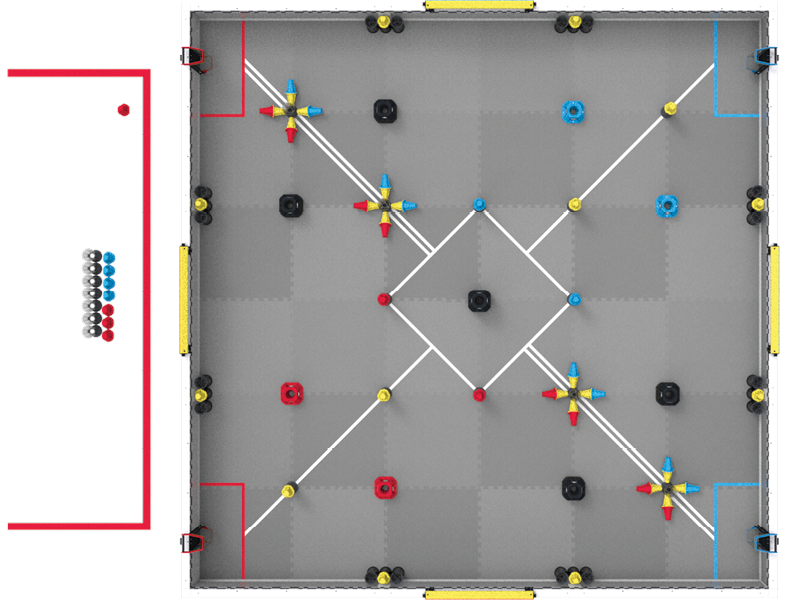
Figure RSC4-1: An overhead view of a VEX V5 Override Robot Skills Match.
This rule is applied differently for VEX U. See Rule VURS1.
This rule is applied differently for the VEX AI Robotics Competition. See Rule VAIRS3.
<RSC5> Skills Stop Time. If a Team wishes to end their Robot Skills Match early, they may elect to record a Skills Stop Time. This is used as a tiebreaker for Robot Skills Challenge rankings. A Skills Stop Time does not affect a Team’s score for a given Robot Skills Match. Drive Team Members and field staff must agree prior to the Match on the signal that will be used to end the Match early.
- Teams who intend to attempt a Skills Stop Time must “opt-in” by verbally confirming with the Scorekeeper Referee prior to the Robot Skills Match. If no notification is given prior to the start of the Match, then the Team forfeits their option to record a Skills Stop Time for that Match and they will receive a default Skills Stop Time of 0.
- This conversation should include informing the Scorekeeper Referee which Drive Team Member will signal the stop. The Match may only be ended early by a Drive Team Member for that Match.
- If a Team runs multiple Robot Skills Matches in a row, they must reconfirm their Skills Stop Time choice with the Scorekeeper Referee prior to each Match.
- Any questions regarding a Skills Stop Time should be reviewed and settled immediately following the Match. T1 and T3 apply to Robot Skills Matches.
- If the event is utilizing a V5 Robot Brain or the TM Mobile app for Robot Skills Challenge field control, a Drive Team Member may elect to start and stop their own Robot Skills Matches.
- This V5 Robot Brain or other device running the TM Mobile app will be used to start the Robot Skills Matches (i.e., “enable” the Robot ), end the Robot Skills Match (i.e., “Disable ” the Robot ), and display the official Skills Stop Time to be recorded.
- This V5 Robot Brain must be running the official field control user program.
- For more information regarding the use of a V5 Robot Brain for Robot Skills Challenge field control, and to download the official field control user program, visit this VEX Knowledge Base article.
- For more information regarding the use of TM Mobile for field control, see the Tournament Manager documentation.
- At events which do not have a V5 Robot Brain or the TM Mobile App available for Robot Skills Challenge field control, Drive Team Members and field staff must agree prior to the Match on the signal that will be used to end the Match early. A manual timer must be used in conjunction with a VEXnet Competition Switch.
- The moment when the Match ends early is defined as the moment when the Robot is “Disabled ” by the field control system. The time shown on the timer should be rounded up to the nearest second. For example, if the Robot is Disabled and the timer shows 25.2 seconds, then the Skills Stop Time should be recorded as 26.
- The agreed-upon signal must be both verbal and visual, such as Drive Team Members crossing their arms in an “X” or placing their V5 Controller(s) on the ground.
- The signal must be given by a Drive Team Member who is standing in the Alliance Station.
- It is recommended that Drive Team Members also provide verbal notice that they are approaching their Skills Stop Time, such as by counting out “3-2-1-stop.”
- It is at the Event Partner’s discretion which method will be used to record Skills Stop Times at a given event. The chosen method must be communicated prior to the start of Matches (such as during an event meeting), and made equally available to all Teams.
- If an event intends to use a manual timekeeping method, a Team cannot bring their own V5 Robot Brain just for use during their own Robot Skills Match.
- If an event intends to utilize a V5 Robot Brain, all Teams must use the same V5 Robot Brain for all Robot Skills Matches on a given Field.
- If an event is using multiple Fields for Robot Skills Matches, the same method must be used at all Fields, as described in rule T21. Multiple V5 Robot Brains may be used as needed (e.g., a “Field 1 Brain” and a “Field 2 Brain”).
- The default timed “Drive” program accessed from a V5 Controller is intended for practice only, and cannot be used for an official Robot Skills Match.
- If a Team chooses to utilize/record a Skills Stop Time, the 5-second grace period described in rule SC1 does not apply.


