<RSC1>Standard rules apply in most cases. All rules from previous sections apply to the Robot Skills Matches, unless otherwise specified in this section.
Violations of <GG>, <SG>, and <RSC> rules that occur during a Robot Skills Match should only affect the outcome of that Match and should not be considered when determining whether a Violation has been repeated during the event.
<RSC2>Scoring Robot Skills Matches. For each Robot Skills Match, Teams are awarded a score based on the standard scoring rules.
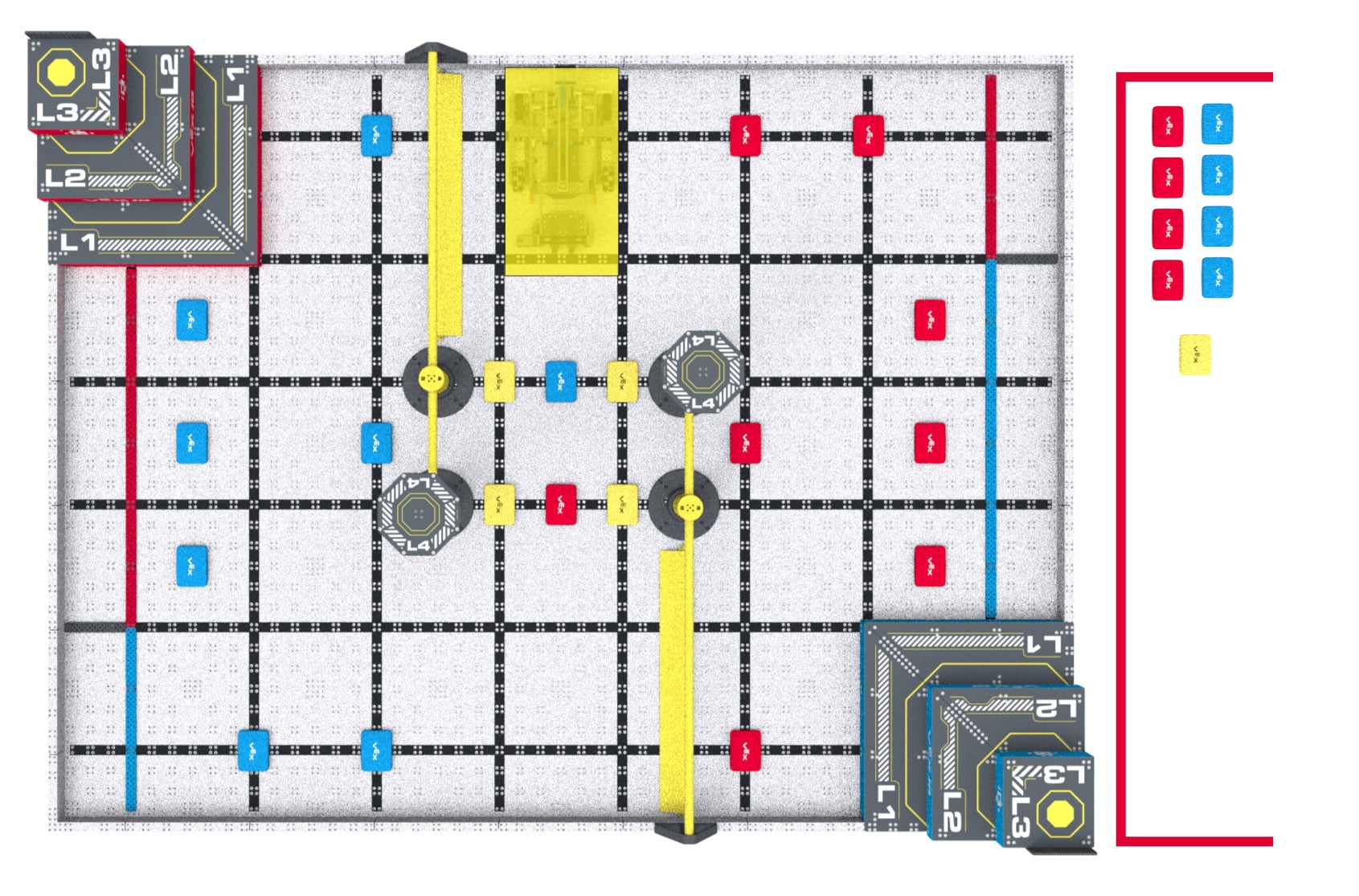
<RSC3>Robot and Field setup for Robot Skills Matches. The Robot and Field are set up the same as for Teamwork Matches, with the following modifications:
The Robot must be placed in the starting position that shares a wall with the red Pyramid Goal at the beginning of the Match and after the Robot is reset under rule GG10 or RSC5.
Figure RSC3-1: The field layout for a VEX IQ Robotics Competition Level Up Robot Skills Match.
<RSC4>Loader and Driver differences. All criteria listed in SG7 apply as written (e.g., a Loader cannot put a Scoring Object into a Load Zone if there’s already a Scoring Object there). Loading is modified as follows:
Upon handling the Robot, it must be immediately brought back to a legal starting position. The Robot does not get a new PreloadScoring Object during this reset.
Drive Team Members may reset or adjust the Robot as desired from this position, including pressing buttons on the Robot brain or activating sensors.
Any Scoring Objects that are Possessed by the Robot while being handled must be removed from the Field, will not be returned to the Field, and cannot be reintroduced by the Loaders. No other Scoring Objects should be moved or adjusted.
Pre-Match sensor calibration is considered part of the standard pre-Match setup time (i.e., the time when the Team would typically be turning on the Robot, moving any mechanisms to their desired legal start position, etc.).
Pressing a button on the VEX IQ Controller to begin the routine is not permitted. To avoid any confusion, Teams are advised not to bring controllers to Autonomous Coding Skills Matches.
<RSC7>Autonomous means “no humans.” During an Autonomous Coding Skills Match, Drive Team Members are not permitted to activate any controls on their VEX IQ Controller, and cannot manually trigger sensors (including the Vision Sensor) in any way, even without touching them.
The agreed-upon signal to stop the Match must be both verbal and visual, such as Drivers crossing their arms in an “X” while saying “Stop!” or placing their VEX IQ Controller on the ground while saying “Done!”
It is recommended that the Driver provides the Scorekeeper Referee with a verbal notice that the Team is approaching their intended Skills Stop Time, such as counting out “3-2-1-stop.”
The moment when the Match ends early is defined as the moment when the Robot and Scoring Objects have come to a rest and the Driver provides the agreed upon visual and audio signal to the Scorekeeper Referee.
If a Tournament Manager display is being used for field timing, then the Skills Stop Time is the time shown on the display when the Match is ended early (i.e., in 1-second increments).
If a manual timer is being used that counts down to 0 with greater accuracy than 1-second increments, then the time shown on the timer should be rounded up to the nearest second. For example, if the Robot is Disabled and the timer shows 25.2 seconds, then the Skills Stop Time should be recorded as 26.