


Compare "Section 3 - Robot Skills Matches": v2.0 → v2.1
Overview
Section titled “Overview”In Robot Skills Matches, Teams have one minute to score as many points as possible. There are two types of Robot Skills Matches: Driving Skills Matches, which are entirely Driver controlled, and Autonomous Coding Skills Matches, which are autonomous with limited human interaction. Teams are ranked based on their combined score in the two types of Robot Skills Matches.
Robot Skills Matches are optional for all Teams. Teams who do not compete in Robot Skills Matches will not be penalized in Teamwork Matches. However, participation in Robot Skills Matches may impact eligibility for judged awards at the event.
At events that include Teamwork Matches, Teams may only participate in Robot Skills Matches if they also participate in the Qualification Matches. See rule T15.
Robot Skills Match Rules
Section titled “Robot Skills Match Rules”<RSC1> Standard rules apply in most cases. All rules from previous sections apply to the Robot Skills Matches, unless otherwise specified in this section.
Violations of <GG>, <SG>, and <RSC> rules that occur during a Robot Skills Match should only affect the outcome of that Match and should not be considered when determining whether a Violation has been repeated during the event.
<RSC2> Scoring Robot Skills Matches. For each Robot Skills Match, Teams are awarded a score based on the standard scoring rules.
<RSC3> Robot and Field setup for Robot Skills Matches. The Robot and Field are set up the same as for Teamwork Matches, with the following modifications:
- The layout of Scoring Objects for a Level Up Robot Skills Match differs from the layout for Teamwork Matches, as shown in Figure RSC3-1.
- Eight (8) Bean Bags (four red and four blue) begin the Match in the red Driver Station for Loading.
- The blue Driver Station and Load Zone are not used in Robot Skills Matches.
- The Robot must be placed in the starting position that shares a wall with the red Pyramid Goal at the beginning of the Match and after the Robot is reset under rule GG10 or RSC5.
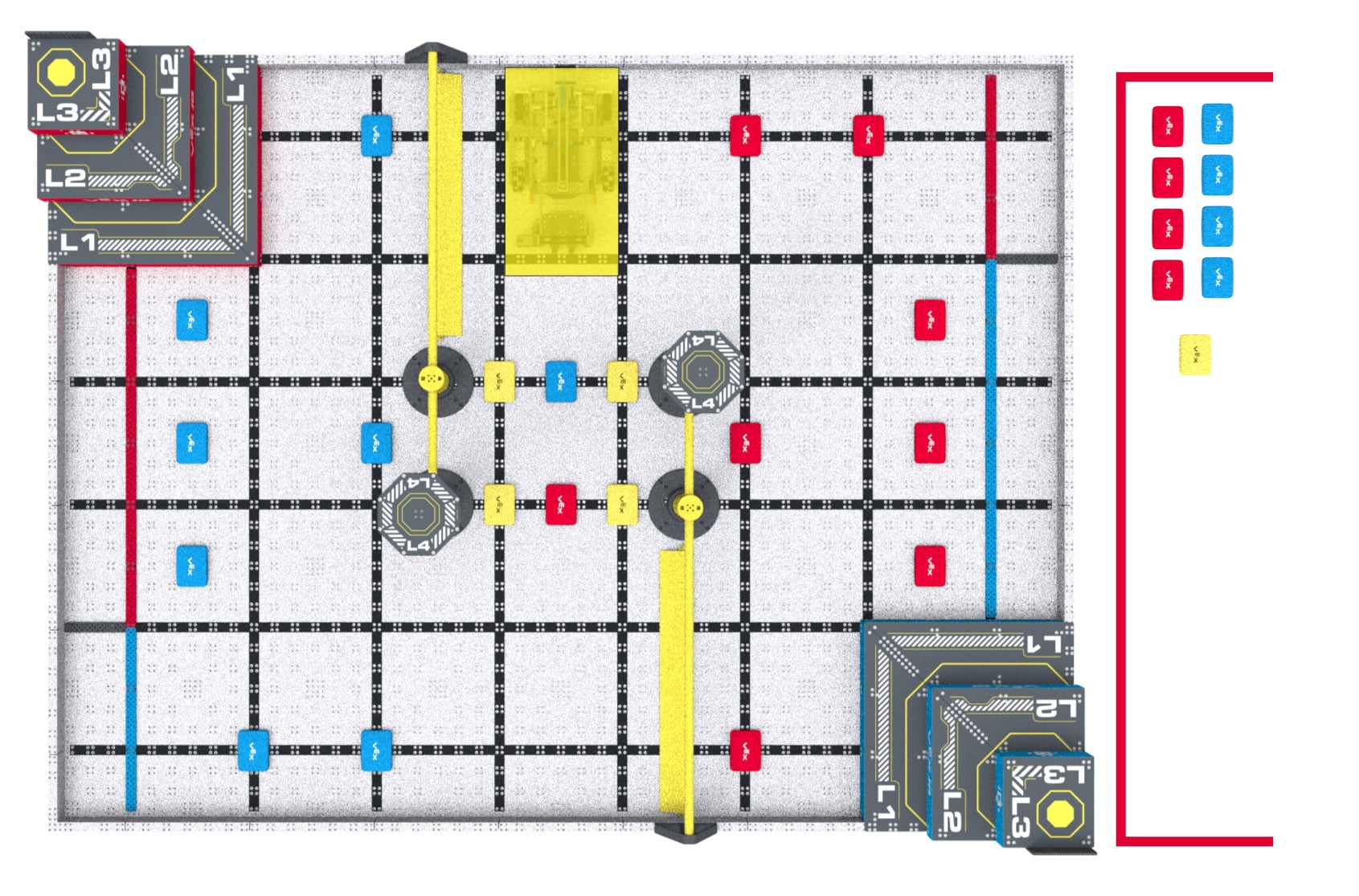
Figure RSC3-1: The field layout for a VEX IQ Robotics Competition Level Up Robot Skills Match.
<RSC4> Loader and Driver differences. All criteria listed in SG7 apply as written (e.g., a Loader cannot put a Scoring Object into a Load Zone if there’s already a Scoring Object there). Loading is modified as follows:
- In Driving Skills Matches and Autonomous Coding Skills Matches, any Driver who is not currently driving the Robot may also serve as a Loader (i.e., a Team may have one, two, or three Loaders at any given time).
- The blue Load Zone is not used in Robot Skills Matches. All Match Loads are Loaded through the red Load Zone in Robot Skills Matches.
- Drive Team Members must remain in the red Driver Station during Driving Skills Matches, except when legally interacting with their Robot per rule GG10.
- During an Autonomous Coding Skills Match, Drivers may move freely around the Field, and are not restricted to the Driver Station when not handling their Robot under rule RSC5. This exception permits Drivers who wish to “stage” Robot handling during an Autonomous Coding Skills Match to do so without excessive running back and forth to the Driver Station.
<RSC5> Handling Robots during an Autonomous Coding Skills Match. A Team may handle their Robot as many times as desired during an Autonomous Coding Skills Match.
- Upon handling the Robot, it must be immediately brought back to a legal starting position. The Robot does not get a new Preload Scoring Object during this reset.
- Drive Team Members may reset or adjust the Robot as desired from this position, including pressing buttons on the Robot brain or activating sensors.
- Any Scoring Objects that are Possessed by the Robot while being handled must be removed from the Field, will not be returned to the Field, and cannot be reintroduced by the Loaders. No other Scoring Objects should be moved or adjusted.
- As described in rule S1, Students cannot step into the Field at any time during a Match. If the Drive Team Members cannot reach the Robot due to the Robot being in the center of the Field, they may ask the Head Referee to pick up the Robot and hand it to the Drive Team Members for placement according to the conditions above.
<RSC6> Starting an Autonomous Coding Skills Match.Drivers must start a Robot’s Autonomous Coding Skills Match routine by pressing a button on the Robot brain or manually activating a sensor. Because there is no VEX IQ Controller hand-off, only one Driver is required for an Autonomous Coding Skills Match (though Teams may still have two if desired).
- Pre-Match sensor calibration is considered part of the standard pre-Match setup time (i.e., the time when the Team would typically be turning on the Robot, moving any mechanisms to their desired legal start position, etc.).
- Pressing a button on the VEX IQ Controller to begin the routine is not permitted. To avoid any confusion, Teams are advised not to bring controllers to Autonomous Coding Skills Matches.
<RSC7> Autonomous means “no humans.” During an Autonomous Coding Skills Match, Drive Team Members are not permitted to activate any controls on their VEX IQ Controller, and cannot manually trigger sensors (including the Vision Sensor) in any way, even without touching them.
- Teams cannot use VEX IQ Controllers for any purpose in Autonomous Coding Skills Matches, and are advised not to bring controllers to the Field. If there is a controller at the Field during an Autonomous Coding Skills Match, it should be placed on the Floor outside the Field and remain untouched until after the Match.
<RSC8> Skills Stop Time. If a Team wishes to end their Robot Skills Match early, they may elect to record a Skills Stop Time. This is used as a tiebreaker for Robot Skills rankings. A Skills Stop Time does not affect a Team’s score for a given Robot Skills Match. Drivers and field staff must agree prior to the Match on the signal that will be used to end the Match early.
- Teams who intend to attempt a Skills Stop Time must “opt-in” by verbally confirming with the Scorekeeper Referee prior to the Robot Skills Match. If no notification is given prior to the start of the Match, then the Team forfeits their option to record a Skills Stop Time for that Match and they will receive a default Skills Stop Time of 0.
- This conversation should include informing the Scorekeeper Referee which Driver will signal the stop. The Match may only be ended early by a Driver for that Match.
- The agreed-upon signal to stop the Match must be both verbal and visual, such as Drivers crossing their arms in an “X” while saying “Stop!” or placing their VEX IQ Controller on the ground while saying “Done!”
- It is recommended that the Driver provides the Scorekeeper Referee with a verbal notice that the Team is approaching their intended Skills Stop Time, such as counting out “3-2-1-stop.”
- The moment when the Match ends early is defined as the moment when the Robot and Scoring Objects have come to a rest and the Driver provides the agreed upon visual and audio signal to the Scorekeeper Referee.
- If a Tournament Manager display is being used for field timing, then the Skills Stop Time is the time shown on the display when the Match is ended early (i.e., in 1-second increments).
- If a manual timer is being used that counts down to 0 with greater accuracy than 1-second increments, then the time shown on the timer should be rounded up to the nearest second. For example, if the Robot is Disabled and the timer shows 25.2 seconds, then the Skills Stop Time should be recorded as 26.
- If a Team runs multiple Robot Skills Matches in a row, they must reconfirm their Skills Stop Time choice with the Scorekeeper Referee prior to each Match.
- Any questions regarding a Skills Stop Time should be reviewed and settled immediately following the Match. T1 and T3 apply to Robot Skills Matches.